
Getting locked out of your Samsung phone is a very common problem among users. A lot of individuals search for free unlock codes to get back into their mobile devices. However, many websites offer fake codes that never work for a locked screen. It is important to know that these codes usually apply to network carriers.
If you forgot your password, you actually need a different type of solution. When official methods fail, a professional tool like Dr.Fone Screen Unlock can help you. Thus, in this guide, we will explain how to fix your phone without wasting any more time.
Part 1. What Samsung “Free Unlock Codes” Really Mean: Carrier Unlock vs Screen Lock
Many people mistake a network unlock code for a screen lock removal code. These free codes usually only help you use a different SIM card network. They do not help you bypass a forgotten PIN or a secure pattern. As an example, there are codes such as “#0111*0000000#” which are designed to unlock the SIM on specific devices. Moreover, a carrier unlock code is tied to your unique phone IMEI number instead.

However, your screen lock protects all your private data and local phone files. Most modern Samsung devices use very strong encryption for your personal device security. You often need reliable Android screen lock removal software to solve this problem. A few old master codes, such as “*2767*3855#,” work by erasing your stored data or performing a factory reset. Hence, do not trust websites that promise a free code for your screen lock.
Part 2. Forgot Your Samsung Passcode? Why Unlock Codes Won’t Work
Searching for Samsung free unlock codes will not help with a locked screen. Modern Samsung phones use local security keys instead of simple remote entry codes. You must use a specific recovery workflow to regain access to your device. The following table explains exactly why these codes fail for your lock screen:
| Reason Unlock Codes Fail | What the Code Is Designed For | Why It Cannot Unlock the Screen |
| Screen Locks Use Encryption | Network or SIM access only | Screen security is protected by device?level encryption |
| Codes are Carrier?based | Switching mobile networks | Carrier systems do not control screen passwords |
| No Authentication Access | IMEI and network verification | PIN and pattern checks happen inside secure hardware |
| Master Codes are Outdated | Resetting older Android phones | Modern devices block these codes or erase data |
| Online Code Lists are Fake | Attracting clicks and traffic | They are not linked to real Samsung unlock systems |
Part 3. How to Unlock a Samsung Phone Officially: Best Recovery Paths
The safest solution is to use official recovery methods in case your phone is locked. These options come from Samsung and are designed to verify your identity. You should explore these choices before trying any third-party screen removal tools. Let’s explore how to unlock a Samsung phone without a passcode using 2 methods:
1. Forgot PIN Method (Old Lock Required)
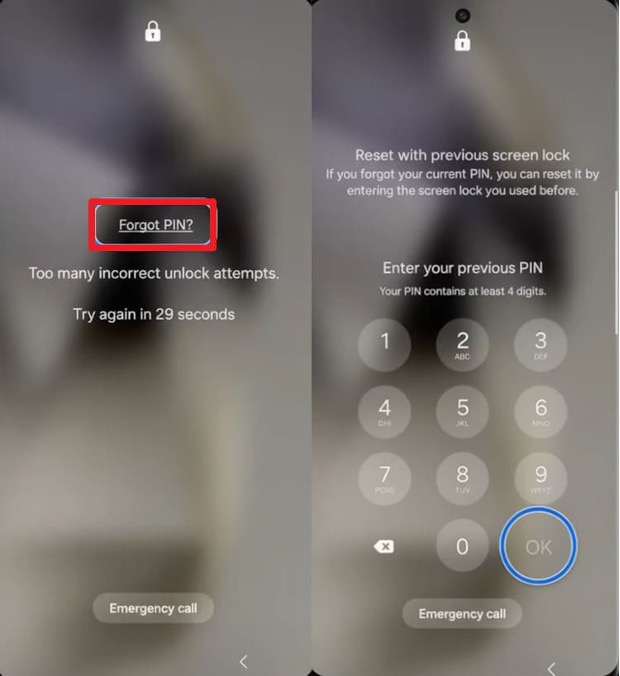
Samsung introduced a very helpful feature for its modern Galaxy devices. It allows users to verify their identity using their previous password. Besides, this recovery feature works only on devices running One UI 6.1 or later. However, it expires after 72 hours, making it unlockable with limited availability. Hence, review these steps to restore your access using the old password method:
Step 1. When you enter the wrong password at least 5 times, tap “Forget PIN.” As prompted, enter your earlier “PIN/Password/Pattern,” then tap “OK” to continue.
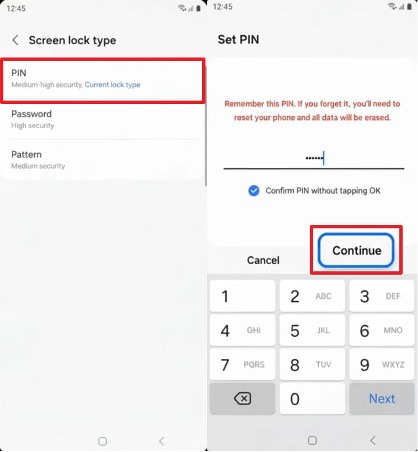
Step 2. Finally, select a new security option and create a fresh code. Upon completing the task, your Samsung phone will unlock and allow full access.
2. Recovery Mode Factory Reset (Data Loss)
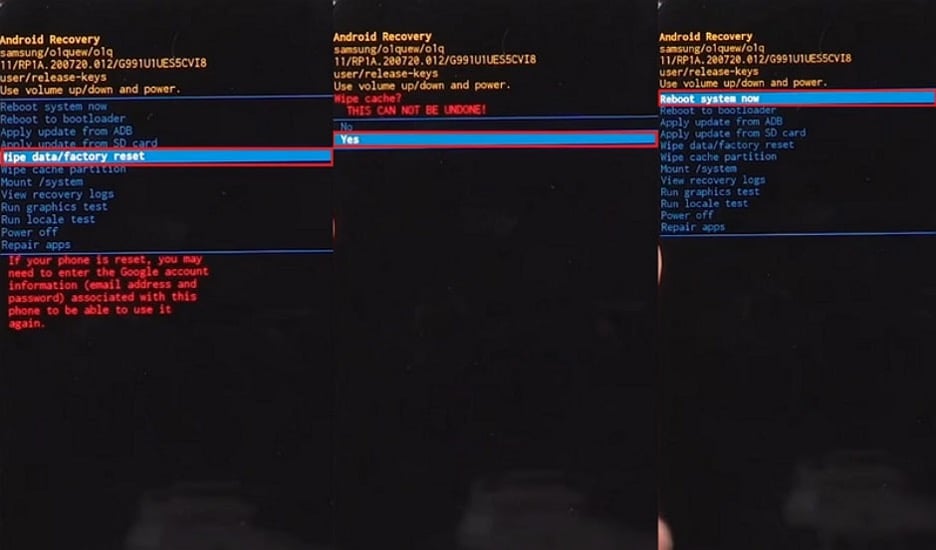
A factory reset is a standard way to wipe your locked device. This method removes your forgotten password and lets you regain access to your phone. However, you will lose all data on the internal memory. You should only use this path if you have a recent cloud backup. If you want to avoid this, try using Android screen lock removal software. Anyhow, follow these steps to perform a hard reset:
Step 1. Continue pressing the “Power” and “Volume Down” buttons, then tap “Power Off.” As the device shuts down, enter Recovery Mode according to your Samsung model:
- No Home button: Keep pressing “Volume Up + Power” until the Samsung logo appears.
- With a Home button: You need to hold “Volume Up + Home + Power” until the Recovery screen loads.
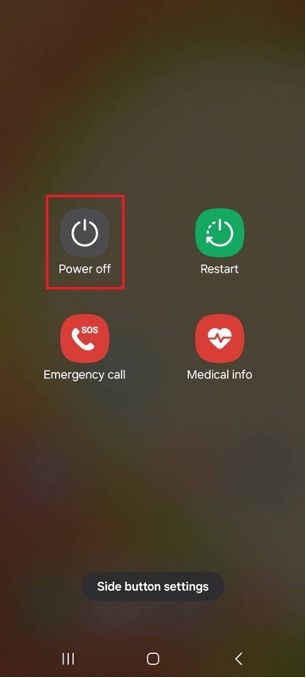
Step 2. You can then use the “Volume Down” key and opt for “Wipe Data/Factory Reset.” Then, press the “Power” button to select this option. Confirm by choosing “Yes” and selecting “Reboot System Now” to restart the phone.
Part 4. When to Use an Android Screen Lock Removal Tool – Use Cases
Official recovery methods might not always work for every Samsung user. You may face complex issues that require a more powerful technical solution. In these specific cases, a professional tool like Dr.Fone Screen Unlock is necessary. Thus, below are real scenarios where lock removal tools provide effective unlocking support:
- Forgotten Password: You cannot remember your complex screen password or your unique security pattern. Such software can help you bypass the lock without any difficult technical steps.
- Broken Screen: Your phone screen is badly cracked and does not respond to your touch. Still, you can unlock the device using a computer and a removal tool to save your data.
- System Failure: A sudden software glitch has locked you out of your favorite Samsung phone. Professional tools fix these errors by removing the faulty screen lock interface.
- Secondhand Phone: You bought a used phone that still has the previous owner’s lock. These tools remove the old security so you can use the device immediately.
- Biometric Issues: Your fingerprint sensor or face recognition is not working to open the phone. Use this guided method to bypass those sensors and enter the home screen.
Part 5. How Dr.Fone Screen Unlock Helps Remove Samsung Locks Quickly
If official methods fail, you still need a powerful way to access your device. Therefore, it is recommended to use Dr.Fone – Screen Unlock (Android) for your Samsung. This professional tool is the best way to bypass any modern mobile security lock. The software works quickly and removes most screen locks in under 5 minutes. It’s ideal for those still wondering how to unlock a Samsung phone without a passcode.
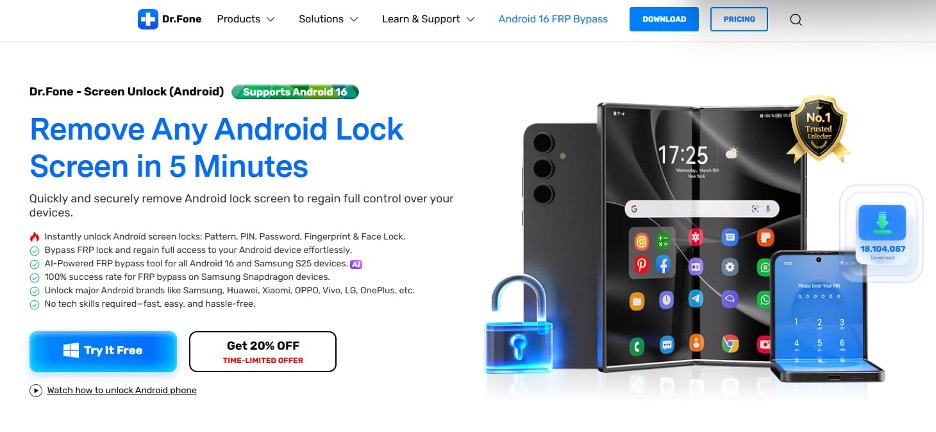
Moreover, you can bypass PIN codes, complex passwords, and even unique drawing patterns. It also supports the removal of advanced biometric locks like fingerprints and face data. Dr.Fone supports phones running up to Android 16, offering maximum compatibility for recent versions. While unlocking, users can even follow a very clear guided process to enter the “Download Mode.”
Key Features
- Wide Compatibility: Support for over 2,000 different Android phone and tablet models worldwide.
- Model Identification: Select your exact device name to get the most accurate recovery path.
- FRP Bypass: Easily remove the Google verification lock after performing a full factory reset.
Guide to Remove Samsung Locks Using Dr.Fone – Screen Unlock
Using the right Android screen lock removal software makes the entire process effortless. This program provides a clear and guided path for every Samsung mobile user. Hence, follow this detailed guide to remove your screen lock in 5 minutes:
Step 1. Launch the Android Screen Unlock Feature
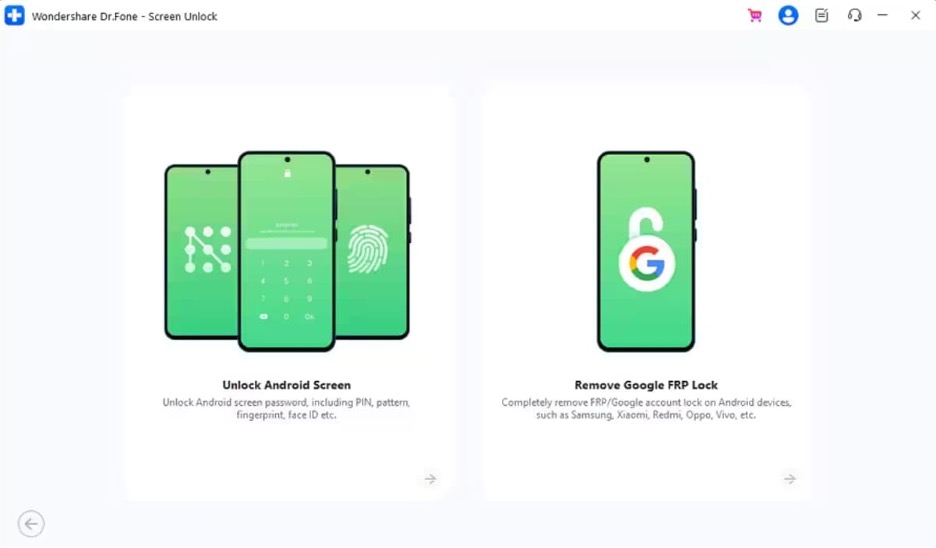
To initiate, choose the “Screen Unlock” feature, then select “Android” as the platform. Click “Unlock Android Screen” and connect your locked Samsung device to the PC.
Step 2. Provide Your Samsung Phone Details
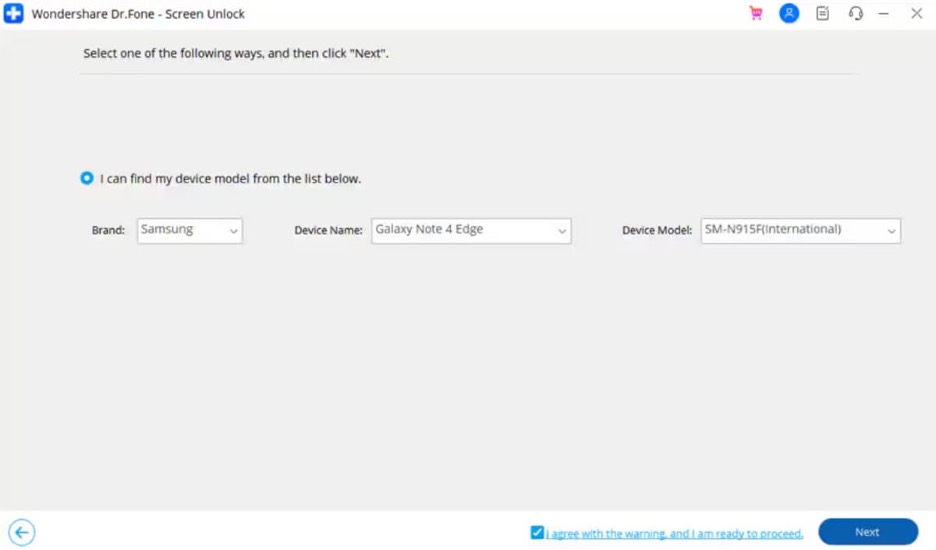
Select “Samsung” as the device brand and choose “Remove Without Data Loss” as the unlock option. Enter the required information, including your phone’s model, and click “Next” to continue.
Step 3. Remove the Screen Lock from Samsung
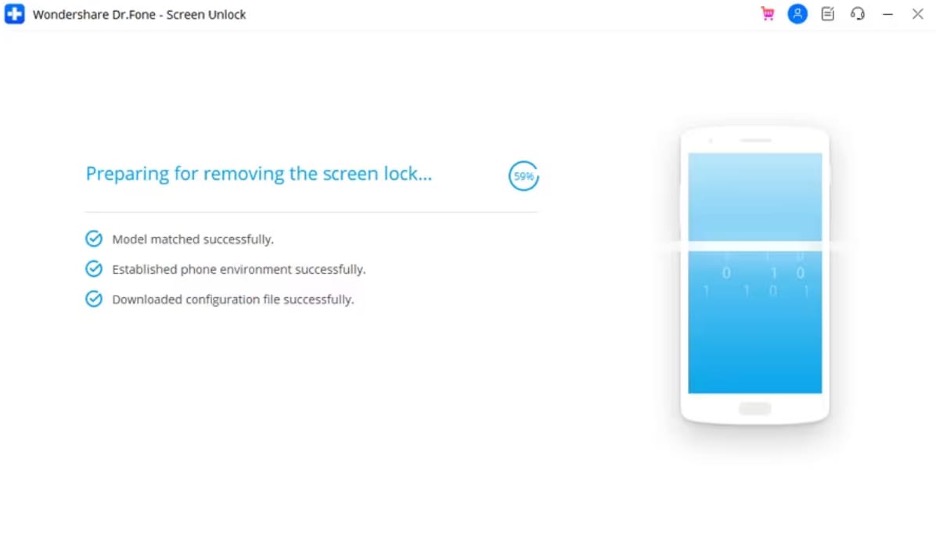
When the confirmation screen appears, press “Confirm” upon typing “000000.” Here, follow the visual instructions to switch your phone into “Download Mode.” The tool will then start unlocking the screen and show confirmation upon completion.
Conclusion
In summary, stop wasting your time searching for fake Samsung screen unlock codes online. These methods do not work on modern devices with high security encryption. You should focus on official recovery paths or professional software tools instead. This particular approach will save your data and help you regain mobile access. In case you need a fast and effortless solution, you should try Dr.Fone Screen Unlock.
