
Losing precious family photos due to deletion by mistake causes immediate distress. This situation happens daily to thousands of smartphone owners. You might feel complete panic when your favorite memories disappear. Fortunately, your special moments are not yet wiped from your phone system.
PhotoAiD reports that the average smartphone camera roll holds around 2,795 photos total. Deploying professional Android data recovery software can bring your pictures back. Therefore, anyone can restore their files prior to new data overwriting them. This comprehensive guide covers how to salvage your imagery without stress.
Part 1. Why Should You Use Third-Party Recovery Tools?
Third-party programs offer the highest chance of reclaiming deleted media. These programs use deeper scanning methods than standard default phone features. Besides, Handy Recovery Advisor claims that around 79% of DIY recovery users get files back. Let us analyze why default smartphone systems cannot handle deep storage extraction:
Why Built-In Android Recovery Options Fall Short
Native smartphone features, including Trash Bins, have strict restrictions that limit recovery. Review this quick table detailing why standard system utilities fail:
| Built-In Option | Why It Falls Short |
| Recently Deleted Folder | Permanently erases photos after just 30 days, with no recovery after. |
| Factory Reset | Destroys encryption keys, making photos unrecoverable even with advanced tools. |
| OEM/Cloud Backups | Only restores photos saved before the last backup, missing newer files. |
| ADB/File Extraction | Reads only visible files, missing deleted records, or deep app data. |
How Android Data Recovery Software Finds Deleted Photos
Basically, deleted photos leave behind digital traces even after they disappear. The best Android data recovery software scans this hidden storage data deeply. It searches unallocated space where deleted file fragments often still exist. Alongside that, this deep scan ignores the missing file index that Android uses.
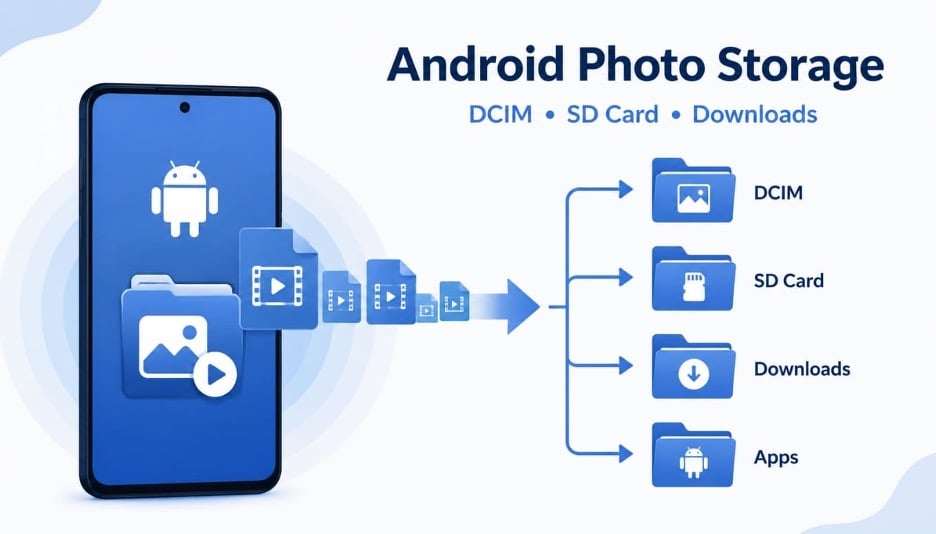
Instead, it identifies photos through unique, specific file signatures and data patterns. Every photo format carries a recognizable structure that the software can detect. Once located, the software reconstructs these fragments into complete, fully viewable images. Moreover, this entire process happens without needing any prior root access.
Top Benefits of Specialized Data Recovery Tools
Specialized recovery tools offer far more than simple basic file restoration features. Thus, here are 5 major benefits that make these recovery tools worthwhile:
- No-Backup Recovery: These tools recover photos if there is no cloud or local backup. This makes them essential when you have never backed up your photos ever.
- Format Variety: Such tools recognize diverse image files like JPEG or PNG. No matter the original file type, the program reconstructs pictures.
- Device Compatibility: The software functions across thousands of popular smartphone models. Thus, it handles major phone brands without causing unexpected system conflicts.
- Preview Option: Recovery software lets you preview photos before restoration. This feature helps you select only the specific photos you actually need.
- Selective Recovery: Users can also choose specific photos, rather than restoring everything. Such a capability control saves valuable time and important device storage space.
Part 2. How to Recover Deleted Android Photos Without a Backup Using Dr.Fone
Losing important photos without backups leaves many Android users feeling helpless. Standard recovery methods often fail when files are deleted. In such situations, software such as Dr.Fone – Data Recovery (Android) gives a reliable solution. Users can use it to scan internal storage and locate deleted photo traces. Moreover, it lets you preview recoverable photos before exporting to your device.
While learning how to retrieve deleted photos, it supports 6,000+ Android devices from major brands. Dr.Fone also recovers photos lost through accidental deletion or even sudden resets. It can even retrieve photos from phones with completely broken or unresponsive screens. Furthermore, the utility fully supports data extraction from the modern Android 16 platform.
Guide to Recover Deleted Android Photos Without a Backup Using Dr.Fone
Restoring your missing photos requires a few simple steps in software. These exact steps ensure accurate results without causing any further file damage. Adhere to the given steps to rescue your precious personal image files:
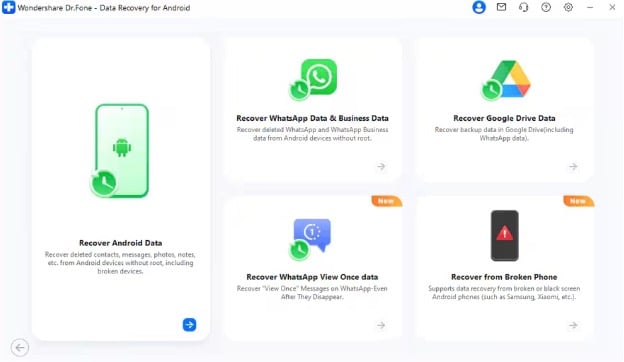
Step 1. Launch Android Data Recovery Mode
Users need to click “Data Recovery” upon heading to the “Toolbox” section. Now, choose the “Android” category and click “Recover Android Data” on the next screen.
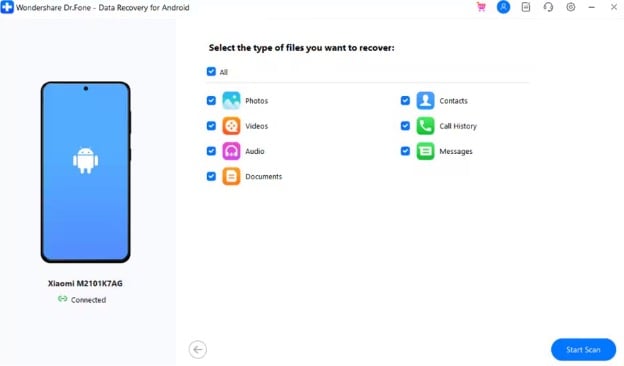
Step 2. Scan Your Device for Deleted Photos
For further processing, connect your Android to the computer using a USB cable. Once the device is detected, select “Photos” from the available data categories. Then, press “Start Scan” to let the software search for deleted image files stored on the device.
Step 3. Check and Restore Lost Photos
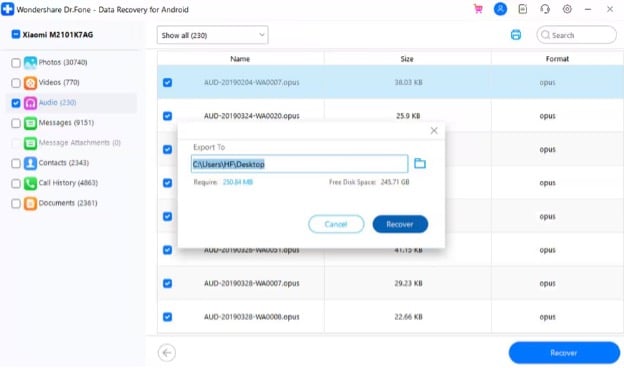
When the scan is complete, browse through the list of recoverable photos. Choose the images you want to retrieve and click the “Recover” button. Next, specify a destination folder on your computer and select “Recover” again.
Part 3. 5 Prevention Tips to Avoid Future Android Photo Loss
Even the best Android data recovery software cannot replace smart prevention habits. The table below outlines crucial tips for protecting your future Android photos:
| Prevention Strategy | Implementation Method |
| Cloud Automation | Turn on automatic syncing in Google Photos. |
| Physical Backups | Copy camera directories to your computer monthly. |
| Write Prevention | Stop taking new photos immediately after deletion. |
| Power Management | Never update firmware with a low phone battery. |
| Application Safety | Use reliable gallery apps with secure trash bins. |
Conclusion
In summary, deleted Android photos are often recoverable when you act without delay. Understanding recovery methods improves your chances of restoring memories. Using reliable Android data recovery solutions helps locate hidden deleted files.
Additionally, prevention strategies reduce the risk of losing important photos again. Regular backups and careful device usage offer valuable long-term protection. When built-in recovery methods fail, tools like Dr.Fone can recover your photos. Experts also recommend using Dr.Fone to recover precious lost photos with confidence.
