
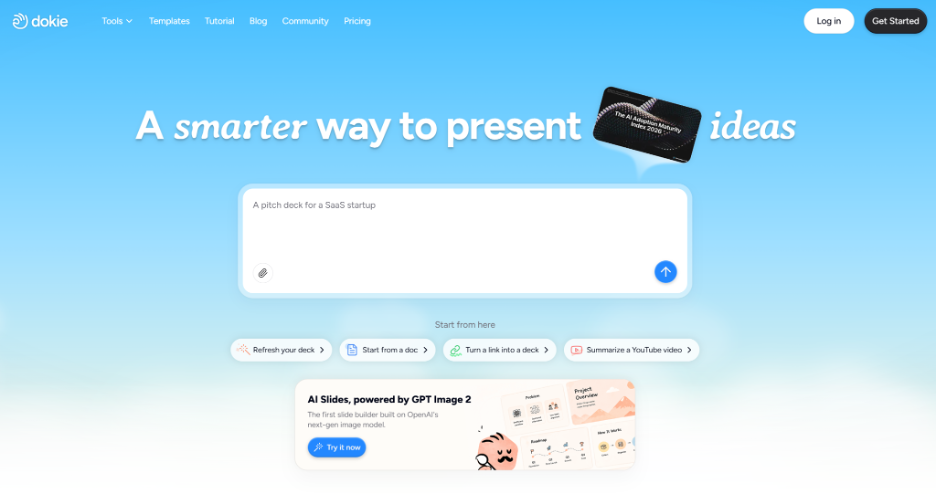
What Is Dokie AI?
Dokie AI is an AI-powered presentation maker that helps users generate complete slide decks from prompts, notes, documents, spreadsheets, images, and other content sources. Instead of starting from a blank PowerPoint file, users can use Dokie AI to create a first draft with slide structure, content, layout, and design.
The main value of Dokie AI is that it reduces the time spent on outlining, formatting, and designing slides manually. For many people, creating a presentation is not difficult because they lack ideas. It is difficult because turning those ideas into a clear, professional-looking deck takes time. Dokie AI helps solve that problem by generating a usable presentation draft that can be further edited and refined.
Who Is Dokie AI For?
Dokie AI is best for users who regularly create presentations for work, study, or content creation.
For business users, Dokie AI can help create marketing reports, sales presentations, project updates, strategy decks, client proposals, product introductions, and internal training materials. For founders and startups, it can be used to draft pitch decks, investor updates, product roadmaps, and go-to-market presentations. For educators and students, it can help turn lesson materials, research notes, and long documents into organized slides.
However, Dokie AI feels especially useful for professional and business scenarios. If you need a presentation that looks clean, has a clear structure, and can be exported as an editable deck, Dokie AI is a strong option.
Key Features of Dokie AI
1. AI Presentation Generator
The core feature of Dokie AI is its AI presentation generator. Users can enter a topic, prompt, outline, or rough idea, and the tool will generate a complete presentation.
This is useful when you need a quick starting point. Instead of manually deciding every slide title and section, Dokie AI creates a structured draft for you. You can then review the logic, edit the message, adjust the design, and prepare the final version.
For example, you can use Dokie AI to create a marketing plan, a business proposal, a quarterly report, a product launch deck, or a training presentation. The generated deck gives you a foundation, so you do not have to build everything from scratch.
2. Text to PPT
Dokie AI’s Text to PPT tool is useful when you already have notes, ideas, bullet points, or a rough outline. You can turn plain text into a full slide deck without manually copying and arranging the content page by page.
This is helpful for users who collect information in messy formats first. For example, a marketer may have campaign notes, a founder may have product ideas, or a teacher may have lesson points. Text to PPT helps organize that raw material into a more presentable format.
3. Word to PPT
The Word to PPT tool is useful for converting long-form documents into presentations. Many business materials start as written documents, such as reports, proposals, briefs, articles, or meeting notes. But presenting that information usually requires a different format.
Dokie AI can help turn a Word document into a slide deck by extracting the main points and organizing them into presentation sections. This is especially useful for business reports, research summaries, training documents, and content repurposing.
4. PDF to PPT
PDF to PPT is one of the most practical tools for users who work with long documents. PDFs are often used for reports, white papers, research papers, company materials, and course documents. Manually summarizing a PDF into slides can take a lot of time.
With Dokie AI’s PDF to PPT tool, users can turn PDF content into a presentation draft more quickly. This is useful for summarizing research, preparing internal briefings, creating study materials, or turning long reports into executive presentations.
5. Excel to PPT
Excel to PPT is useful for users who need to present data, tables, campaign results, financial summaries, or business performance reports. Many presentations are built from spreadsheet data, but copying numbers into slides manually can be slow and messy.
Dokie AI helps convert Excel-based information into a slide format. This can be useful for marketing performance reports, sales summaries, budget reviews, KPI updates, and other data-heavy presentations.
Of course, users should still check the data carefully before presenting. But as a first-draft tool, Excel to PPT can save a lot of formatting and structuring time.
6. JPG to PPT and PNG to PPT
Dokie AI also supports image-to-PPT workflows, including JPG to PPT and PNG to PPT. These tools are helpful when your source material is image-based, such as screenshots, diagrams, visual notes, scanned content, or design references.
For example, you may have screenshots from a product, images from a report, or visual materials that need to be organized into a presentation. Instead of inserting each image manually and building slides around it, Dokie AI can help turn image-based content into a more structured deck.
7. HTML to PPT
HTML to PPT is useful for converting web-based or HTML content into presentations. This can be helpful for users who want to turn landing pages, online reports, product pages, web articles, or structured web content into slide decks.
For marketers, product teams, and business users, this is a useful content repurposing workflow. A web page can become a sales deck, a product overview, a client presentation, or an internal briefing.
8. Editable PowerPoint Workflow
One of Dokie AI’s biggest advantages is its focus on editable presentation output. Many AI presentation tools generate attractive slides, but the output can be difficult to edit or adapt in a normal business workflow.
Dokie AI is more practical because it helps users create decks that can be edited and refined after generation. This matters because most real presentations need human judgment. You may need to change numbers, rewrite a conclusion, adjust branding, remove a slide, or customize the deck for a specific audience.
A good AI presentation maker should not lock users into a fixed output. It should give users a strong draft that they can control. Dokie AI does well in this area.
Dokie AI User Experience
The user experience of Dokie AI is straightforward. You choose the type of presentation or input source, provide your content, and let the AI generate a deck. After that, you review the generated result, adjust the content, and export or continue editing.
The best way to use Dokie AI is not to expect a perfect final deck in one click. Like most AI tools, it works best as a first-draft generator. It helps you get from zero to a structured presentation quickly, but you should still review the content for accuracy, tone, and audience fit.
For example, if you are creating a business report, Dokie AI can help you generate the structure and slides. But you should still verify the data, refine the recommendations, and make sure the story matches your actual business context.
This workflow is where Dokie AI becomes valuable. It does not replace presentation thinking, but it removes much of the repetitive work.
What Makes Dokie AI Different?
Dokie AI stands out because it is not only a prompt-to-slide generator. Its content-to-PPT tools make it useful for real-world workflows where users already have source materials.
Many users do not start presentations from a blank prompt. They start from a PDF, a Word document, an Excel report, a screenshot, a web page, or a set of notes. Dokie AI’s tools are helpful because they match how presentations are actually created.
Another difference is that Dokie AI feels more focused on traditional slide decks. Some AI presentation tools are better for web-style storytelling or interactive documents. Those tools can be impressive, but they may not always fit a workplace where the final deliverable needs to be a standard presentation deck.
Dokie AI is strongest when the goal is simple: create a professional slide deck faster, edit it, and use it in a real meeting or presentation.
Dokie AI Pros and Cons
Pros
Dokie AI can save a lot of time when creating presentation drafts. It supports multiple input formats, including text, Word, PDF, Excel, images, and HTML. This makes it useful for users who need to turn existing content into slides.
The tool is also practical for business presentations. Its output is better suited for reports, proposals, training decks, client updates, and pitch decks than many generic slide generators.
Another advantage is editability. Dokie AI helps users create presentations that can be reviewed and customized, instead of producing a fixed visual asset that is hard to change.
Cons
Dokie AI still requires human review. Users should check the accuracy of generated content, especially for data-heavy slides, business analysis, or technical topics.
The design may also need additional customization if a company has strict brand guidelines. For highly polished executive decks or agency-level design work, users may still need to refine the final version manually.
Dokie AI is best used as a productivity tool, not a complete replacement for strategy, messaging, or presentation skills.
Dokie AI vs Gamma
Gamma is excellent for modern, web-style presentations and visual storytelling. It is a strong tool when you want to create interactive, polished content that can be shared online.
Dokie AI, on the other hand, is better for users who need a traditional presentation workflow. If your final goal is an editable PowerPoint-style deck for business use, Dokie AI may be more practical.
Gamma is great for storytelling and visual documents. Dokie AI is stronger for business decks, file-to-PPT workflows, and users who need to turn existing materials into presentations.
Dokie AI vs Canva
Canva is a powerful design platform with a huge template library. It is excellent for users who want visual customization, brand assets, graphics, and flexible design editing.
Dokie AI is more focused on AI-powered presentation creation and content conversion. If your main need is to turn documents, PDFs, spreadsheets, or notes into a structured deck, Dokie AI may be more efficient.
Canva is better for design-heavy customization. Dokie AI is better for quickly creating structured, editable presentation drafts from different content sources.
Dokie AI vs Beautiful.ai
Beautiful.ai is known for smart slide layouts and consistent design. It is useful for teams that want clean, branded presentations with design guardrails.
Dokie AI is more flexible for generating presentations from different types of content. Its tools like Word to PPT, PDF to PPT, Excel to PPT, and HTML to PPT make it useful for users who need to convert existing materials into slides.
Beautiful.ai is strong for design consistency. Dokie AI is strong for content-to-presentation workflows.
Is Dokie AI Worth It?
Yes, Dokie AI is worth trying if you create presentations regularly and want to reduce the time spent on structure, formatting, and slide creation.
It is especially worth it for users who often work with documents, reports, spreadsheets, PDFs, screenshots, or web content. Instead of manually turning those materials into slides, Dokie AI gives you a faster way to create a presentation draft.
Dokie AI is also a good choice for business users who need decks that are practical, editable, and easy to refine. It may not replace a professional designer for high-end custom decks, but it can significantly speed up everyday presentation work.
Final Verdict
Dokie AI is a practical AI presentation maker for users who need business-ready slides and editable PowerPoint-style decks. Its biggest strength is that it supports real presentation workflows, including Text to PPT, Word to PPT, PDF to PPT, Excel to PPT, JPG to PPT, PNG to PPT, and HTML to PPT.
For marketers, founders, consultants, educators, sales teams, and business professionals, Dokie AI can help turn raw content into structured presentations much faster. It is not a magic one-click replacement for human thinking, but it is a valuable tool for creating strong first drafts and reducing manual slide work.
If you are looking for an AI presentation maker that focuses on practical output, editable decks, and multiple content-to-PPT tools, Dokie AI is a strong option to consider.
