
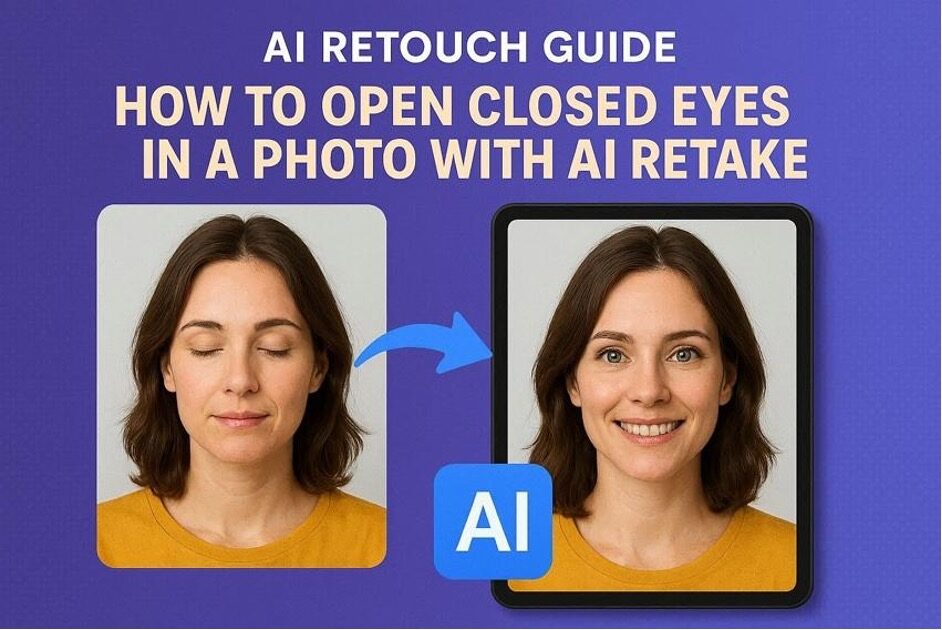
Have you ever taken the best shot and later on noticed that someone was closing their eyes? Or maybe you have just captured the best group photo, everyone is fine, and someone sneezed and spoiled the picture. It happens a lot, and it is quite annoying when you are not aware of how to fix it.
In this article, we will discuss AI-based applications and how they address the problem of closed eyes. With this tool, users can avail of AI retouch features instantly with just the press of a button.
Part 1. Why AI Retouch Tools Can Open Closed Eyes in Photo Instantly
This is an example of cutting-edge technology that photographers and everyday users now rely on to save their precious memories. Below, we have described the mechanism by which these AI tools are able to perform so well.
- Face Recognition and Landmark Localization: These tools first detect the face, then locate key facial features, including the eyes, pupils, and surrounding skin. This provides the model with a strict blueprint of where and how the eyes should be opened.
- Closed-eye Region Analysis: The system recognizes whether the eyelids are closed or half-closed and examines wrinkles, lashes, and brow position. Afterwards, it identifies the probable shape and orientation of the open eye on that particular face.
- Generative Eye Synthesis: It uses deep learning to create realistic open eyes that resemble a person’s, including iris shape, size, and gaze direction. All of this is done rather than merely duplicating those of a different image.
- Lighting and Texture Blueprint: They use the new eyes to match the original photo’s lighting, color temperature, shadows, and skin texture. It is an important step in ensuring that the original and new photos look identical.
- Context-Aware Blending: Lastly, the area where the eyes were edited is merged back into the image with a smooth edge. With constant sharpness and natural facial expressions to produce the effect of it being an original, unedited picture.
Part 2. Best AI Tools that Open Closed Eyes in Photo Without Manual Editing
When restoring or improving photos, the Relumi app stands out as an AI-powered tool designed to enhance and revive images. It enables users to fix closed eyes on the photos, rebuild old or broken photos, and sharpen blurred photos. With just a couple of taps using a simple mobile interface, this app recreates perfect memories that can be kept forever.
Relumi allows users to preview the before and after images, ensuring the originality of the image. Also, this tool is very beginner-friendly, so those with no technical expertise can navigate it easily.
Key Features
Let us go through the main features of this app, which make it an ideal solution for all of your photo-editing needs:
- Smart Face and Detail Saving: Improves the overall quality and maintains the face features so that the output can still resemble the original person and scene.
- AI Open Eyes Repair: Intelligently identifies closed or blinking eyes and re-creates natural-looking open eyes so that you can save the portrait or a group shot.
- Old Photo Restoration: Removes scratches, noise, and fading and improves colors and details, which makes old or bad photos clear and more saturated.
- AI Quality Enhancer: To sharpen blurry photos, reduce noise and recover lost details in low-resolution photos, users must try out the AI quality enhancer feature.
- Damaged Photo Repair: According to the app listing, it also detects and fixes any unreadable, incomplete, or broken photo files, including RAW formats.
- Mobile Compatibility: This application is easily available on both Play Store and App Store, where you can fix closed eyes and share with friends on social media.
Part 3. Step-By-Step Method to Open Closed Eyes in a Photo Using AI Retake
Here, go through the steps below to open closed eyes in photo using the Relumi app:
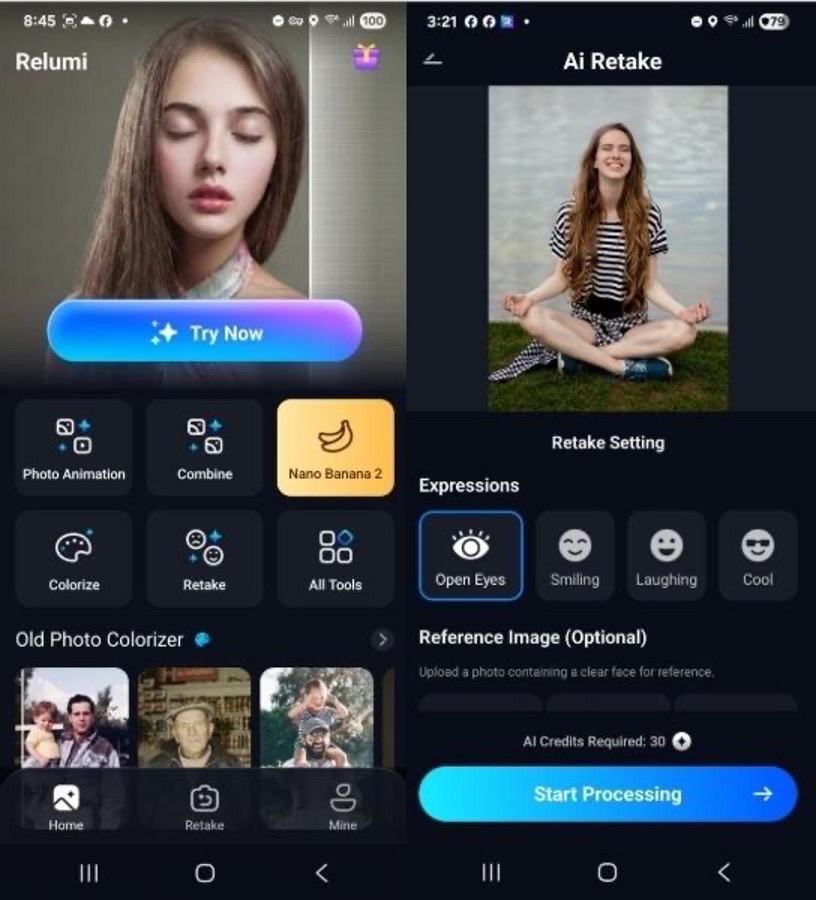
Step 1. Access Retake Feature and Select Open Eyes Expression
To begin, tap the “Retake” section after opening the app. Then, upload the photo you want to retouch and select the “Open Eyes” option from the “Expressions” tab and press “Start Processing.”
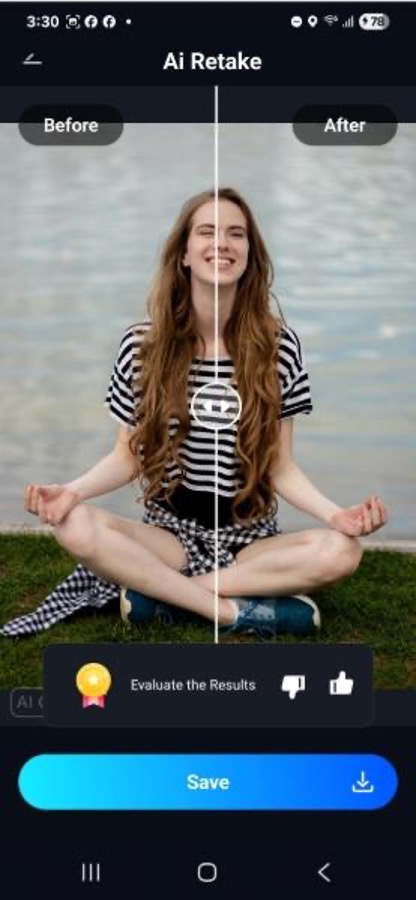
Step 2. Compare the Before and After Photos
The app will take a few seconds and then you will see before and after images side-by-side. Press the “Save” button to download your photo into the gallery.
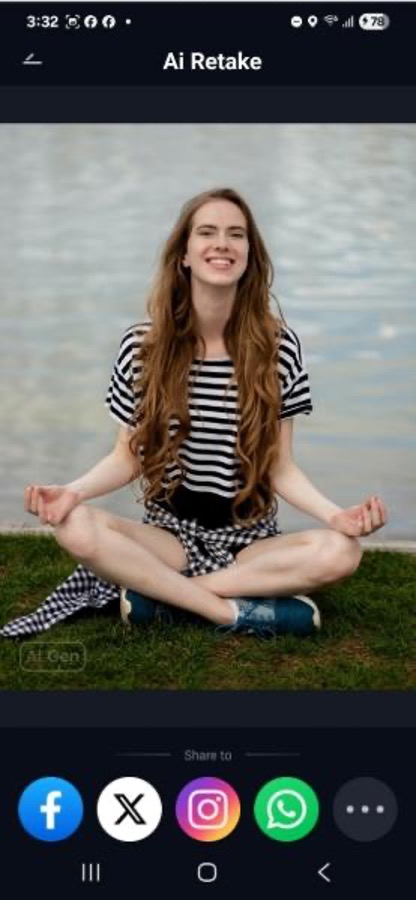
Step 3. Export and Share on Social Media
Finally, you can share the newly remastered photo on social media platforms by pressing on one of the icons at the bottom.
Part 4. Photoshop vs. AI Retouch to Open Closed Eyes in a Photo Compared
Closed eyes can also be fixed using Photoshop, but it usually demands layers, selections, and manual adjustments that take time and skill. In contrast, Relumi, using the AI retake feature, gives users automatic detection, eye reconstruction, and blending in seconds, making them far more convenient for everyday users on the go. Here is a detailed table comparing the two tools below:
| Software | Photoshop | Relumi App |
| Speed | Manual editing so it takes longer | One tap AI fix in seconds |
| Workflow | Desktop-based; multi-tool interface | Simple Mobile app; user-friendly interface |
| Usability | Mainly used for detailed, professional retouching | Everyday photo restoration and enhancement |
| Accessibility | Paid software; heavier setup | Free trial; easy install on Android and iOS |
| Skill Level Required | Requires professional editing knowledge and practice | Beginner-friendly; designed for non-experts |
For users who just want fast, natural results without difficulties, Relumi’s one-tap AI retake and built-in enhancement features make it the most practical choice. Photoshop is a bit more difficult and technical, making it hard to navigate for everyday users.
Conclusion
In summary, Relumi makes AI retouch simple, fast, and accessible for everyone, especially non-experts. Instead of struggling with complex desktop tools, you can open closed eyes, repair old photos, and polish everyday shots in just a few taps. Users who want polished, perfect images should try out Relumi to get digitally retouched photos instantly.
