
I have to browse dozens of websites regularly for work, research, shopping, and leisure activities. If you have been on the internet for a few hours, you know that it is very easy to see a suspicious link, fake download, phishing page, or malware and not even recognize what it was when all was said and done.
Long ago, I really ignored online security because I was sure that simply having an antivirus was all that we needed. I had a few close calls and realized I needed more protection. That’s when I began using IObit Malware Fighter in my cybersecurity regimen.
Since that change, I am feeling a lot more secure on the internet. While I still maintain my good browsing habits, it is reassuring to know there is an extra layer of protection when venturing into new corners of the internet or even downloading files.
I Learned That Online Threats Are Everywhere
In the beginning, when I began suffering online, a malware victim was simply one who visited seedy sites. Luckily, that all settled down because it was entirely untrue.
And even the high-traffic or more traditional sites can be hacked into. Almost every third person can encounter fake ads, insecure browser add-ons, phishing emails, and virus downloads. Criminals are continually devising improved methods for luring victims into clicking content that leads to anything from web pages hosting a malware download to sites posing as the vendor of a blacklisted product. That led me to realise that being safe on the internet did not mean abandoning it. It’s a mindset of readiness for whatever may come. So, I kind of changed the way I do online security to this mindset.
Multiple Scan Modes Make Security Flexible
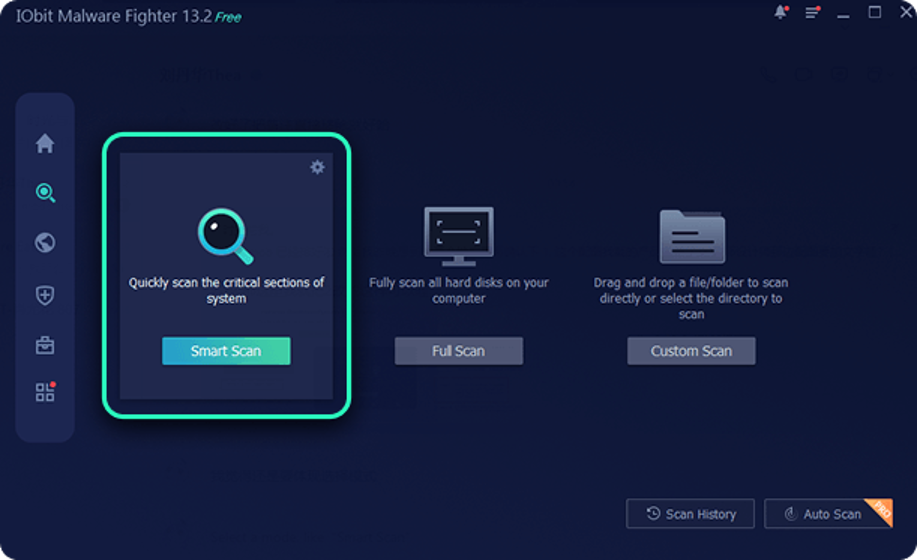
IObit Malware Fighter gives me three different scan options depending on what I need.
Running a scan is straightforward. After launching IObit Malware Fighter, I simply choose the scan mode that best fits my needs:
- Smart Scan for a quick check of the most critical areas of my system.
- Full Scan to thoroughly examine all hard drives for potential threats.
- Custom Scan to scan a specific file, folder, or directory.
If any malware, ransomware, or other suspicious threats are detected, I can remove them with a single click. This simple process makes it easy to perform regular security checks without spending much time managing my computer.
Browser Protection Helps Me Browse More Confidently
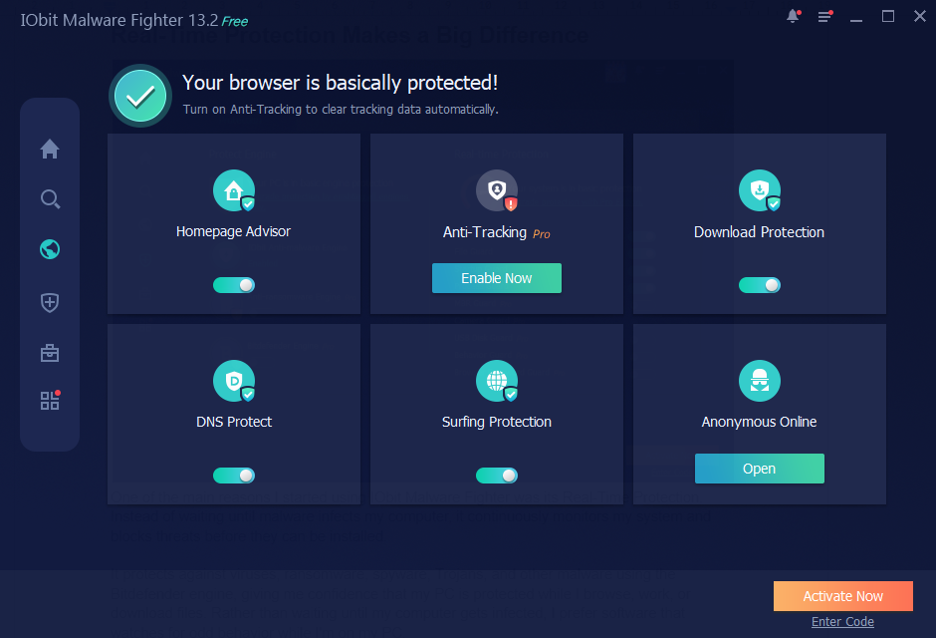
Since I regularly visit unfamiliar websites, Browser Protection has become one of my favorite features.
IObit Malware Fighter helps block phishing websites, prevents unauthorized homepage changes, removes tracking cookies automatically, and blocks annoying advertisements.
I also like the Browser Password Guard, which encrypts my saved browser passwords and prevents unauthorized access to them.
Real-Time Protection Makes a Big Difference
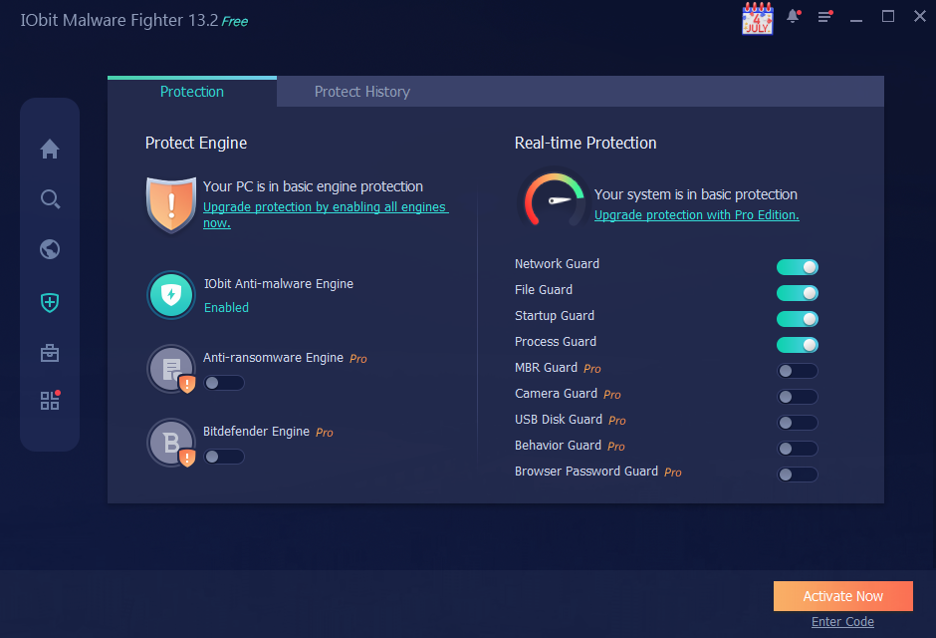
One of the main reasons I started using IObit Malware Fighter was its Real-Time Protection. Instead of waiting until malware infects my computer, it continuously monitors my system and blocks threats before they can be installed.
It protects against viruses, ransomware, spyware, Trojans, and other malware using the Bitdefender engine, giving me confidence that my PC is protected while I browse, work, or download files. Rather than waiting until my computer gets infected, I prefer software that watches for odd behavior while I’m on my PC.
Being proactive makes me feel more secure because most threats can be stopped before any harm is done. You indulge in downloading documents from the work location, opening attachments with emails, or going to unknown websites, knowing all the while that your computer has an extra layer of onslaught.
Download Protection Scans Files Before I Open Them
I frequently download documents, images, software installers, and email attachments for work.
IObit Malware Fighter automatically scans downloaded files before I open them, helping detect potentially harmful files before they can cause problems.
This extra layer of protection makes downloading files feel much safer while still allowing me to work efficiently.
Performance Matters to Me
Beyond antivirus protection, IObit Malware Fighter includes several additional security guards.
It helps secure Windows startup, blocks malicious processes running in memory, prevents unauthorized access from unknown programs, and scans USB drives to reduce the risk of virus infections.
These protections work quietly in the background without interrupting my daily work.
Safe Browsing Is More Than Just Installing Software
Over time, I realized that online safety isn’t achieved by installing one program and forgetting about it.
It requires good digital habits every day.
Some of the practices I always follow include:
- Avoiding pirated software.
- Backing up important files regularly.
- Using multi-factor authentication whenever possible.
- Checking website addresses carefully.
- Never share sensitive information through suspicious emails.
- Regularly reviewing installed browser extensions.
These simple habits have become second nature and have helped me stay safer online.
Why I Continue Using the Same Protection
Using IObit Malware Fighter has made me feel much more confident whenever I browse the internet, download files, or work online.
As a free antimalware tool, features like Real-Time Protection, Browser Protection, Privacy Protection, Download Protection, multiple scan modes, and Comprehensive Security Guards provide much more than basic antivirus protection. While I still practice safe browsing habits, I appreciate knowing that IObit Malware Fighter is continuously monitoring my computer for potential threats. It has become an important part of my daily routine and helps me keep my Windows PC protected without interrupting my work.
