
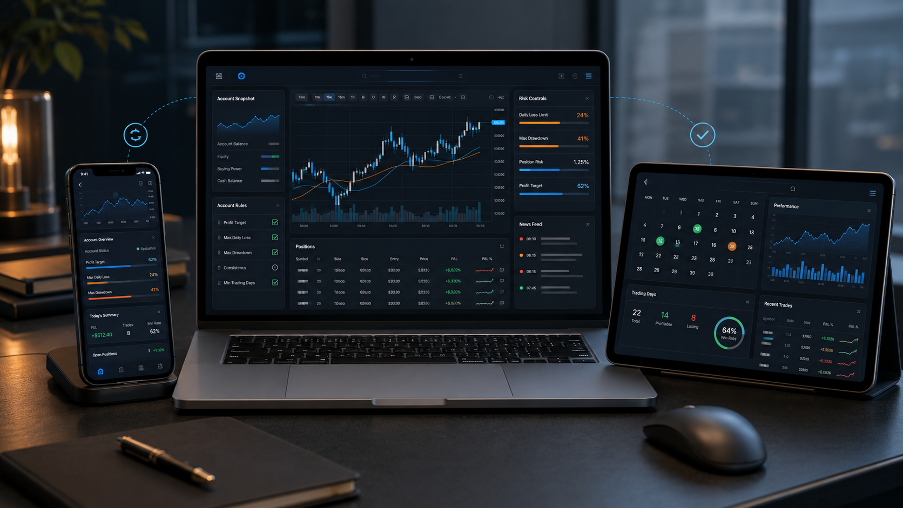
Trading is no longer something that happens only at a desk.
A modern trader may analyse the market on a desktop screen in the morning, check an account dashboard on a tablet in the afternoon, and monitor open positions from a phone while travelling. This does not mean every trade should be made from a mobile device. It simply reflects how trading workflows have changed.
For funded account traders, this multi-device setup is especially important. They are not only watching charts. They are also checking account rules, drawdown limits, payout conditions, trading history and platform access.
That is where a brand such as AIFO fits into the wider conversation. A trading account needs to be usable across the way people actually work: desktop for planning, tablet for review, phone for monitoring, and a platform setup that keeps the trader aware of the rules.
Why mobile workflows matter in funded trading
A funded-style trading account is different from a personal retail account. The trader must operate inside a rule-based structure. Daily loss limits, maximum drawdown, payout eligibility, trading restrictions and consistency rules can all affect the account.
This means the trader needs access to more than just price charts.
They need to know:
What account they are trading
Which rules apply
How close they are to a risk limit
Whether open positions affect drawdown
Which instruments are available
Whether a payout condition has been met
How to reach support if something is unclear
A desktop platform may be the centre of the trading process, but mobile access helps the trader stay informed. The key is to use mobile access for control, not impulse.
Desktop is still the best place to plan
For most traders, desktop remains the best environment for serious analysis.
A larger screen gives more space for charts, notes, calendars, trade journals and account rules. It is easier to compare timeframes, mark important levels, review economic events and plan risk properly.
This matters even more for funded account traders. Before placing any trade, they should understand how the account works. That includes drawdown limits, payout rules, trading restrictions and platform conditions.
A proper desktop routine might include:
Reviewing higher timeframe charts
Checking the day’s economic calendar
Reading account rules before trading
Planning position size
Setting risk per trade
Reviewing open exposure
Checking previous trade records
The desktop should be where decisions are made calmly. It is not just a bigger screen. It is the planning environment.
Tablets are useful for review
A tablet sits somewhere between desktop and mobile. It is portable, but still large enough to review charts, dashboards and account information more comfortably than on a phone.
For many traders, a tablet is useful for checking account status in the evening, reviewing trade history, reading platform notes or monitoring swing positions without sitting at a full desk.
It can also be a good device for learning. Traders can read account guides, payout rules, platform instructions or market commentary without feeling locked into an active trading screen.
This is useful because not every part of trading should feel urgent. Some work is review, not execution.
A tablet can help traders step back and ask:
Did I follow my plan?
Did I respect the account rules?
Are my open trades still valid?
Am I close to any drawdown limit?
Is there a major news event ahead?
Do I need to adjust risk, or simply wait?
That kind of slower review can be valuable.
Phones should be used with discipline
A phone is convenient, but it can also be dangerous for traders.
It allows quick access to charts, positions and account updates. But it also makes it easy to react too quickly. A trader may check the market too often, move stops emotionally, close trades early or enter a new position without proper analysis.
In a funded account, one impulsive mobile decision can affect the whole account. It may push the trader close to daily drawdown, break a risk rule or damage payout eligibility.
The better use of a phone is monitoring.
A mobile workflow should focus on:
Price alerts
Open position checks
Account status
Risk reminders
Urgent trade management
Support access
Platform notifications
Mobile trading should support a plan made elsewhere. It should not replace the planning process.
Swing trading needs clear account visibility
Swing traders often hold trades for longer than intraday traders. They may keep positions open overnight or across several sessions, which is why many traders compare swing trading prop firms by looking closely at holding rules, drawdown calculations and account visibility. That makes mobile and tablet access useful, but it also makes rule clarity essential.
A swing trader needs to know whether overnight holding is allowed, whether weekend holding is restricted and whether floating losses count towards daily drawdown.
This is not a small detail. A swing trade may move against the trader before moving in the intended direction. From a market point of view, the setup may still be valid. But from a funded account point of view, the open loss may create pressure if the drawdown rule includes equity.
That is why swing traders need quick access to account rules and account status.
Before holding positions for longer periods, traders should check:
Can I hold trades overnight?
Can I hold over the weekend?
Does floating loss affect daily drawdown?
Are there special rules for news events?
Can I manage the trade from mobile if needed?
How close is the account to a risk limit?
A good workflow helps the trader avoid guessing.
Platform access should be simple across devices
Device flexibility only works if platform access is clear.
Traders should know how to log in, which server to use, which account is active and what instruments are available. If the trader uses desktop, tablet and mobile, the account experience should feel consistent enough to avoid mistakes.
Basic access details matter:
Desktop platform login
Mobile platform login
Account dashboard access
Password reset process
Server information
Account type
Trading instruments
Support route
Trade history
Account status
If a trader has more than one account, clarity becomes even more important. Accidentally trading the wrong account or misunderstanding account status can create unnecessary risk.
The platform should reduce friction, not add it.
Risk data should be visible before decisions are made
Funded account traders need to see risk information before making decisions.
It is not enough to know whether a trade is in profit or loss. The trader needs to know how the position affects the account. That includes balance, equity, daily loss, maximum drawdown and open exposure.
Good risk visibility can prevent poor decisions.
For example, if a trader sees that the account is close to a daily loss limit, they may decide not to open another trade. If they see that floating loss is increasing, they may reduce exposure. If they see that payout conditions are not yet complete, they may avoid rushing.
Useful risk data includes:
Current balance
Current equity
Daily loss status
Maximum drawdown status
Open trade exposure
Closed profit and loss
Payout progress
Rule warnings
Account standing
This information should be easy to review, especially on mobile.
Alerts should help, not distract
Mobile alerts can be useful, but too many alerts can damage focus.
A trader who receives constant notifications may start reacting to noise. This is especially risky during volatile sessions. The phone becomes less of a risk-control tool and more of a trigger for emotional trading.
Alerts should be selective.
Useful alerts may include:
Price reaching a planned level
A major news event approaching
Account equity moving close to a limit
A platform or account update
A payout status change
An important support response
The goal is to stay informed without turning the phone into a source of pressure.
A good alert system supports the trading plan. It should not create a new decision every few minutes.
Records make multi-device trading safer
When traders move between devices, records become more important.
A trade planned on desktop, monitored on mobile and reviewed on tablet should still belong to one clear trading process. Without records, it becomes easy to forget why a trade was opened or whether a decision was part of the plan.
A simple trading record can help.
Traders can track:
Instrument
Entry reason
Entry price
Stop-loss
Take-profit
Risk amount
Device used
Reason for adjustment
Profit or loss
Rule impact
This is especially useful for swing traders. A position may stay open for several days, and the trader may check it from different devices. Records keep the decision grounded.
They also reveal habits. Some traders may discover that mobile entries perform worse than desktop-planned trades. Others may find that they interfere too much with open positions after checking them on a phone.
Data makes those patterns visible.
Security matters when trading across devices
More access points also mean more responsibility.
Traders should protect platform credentials, account dashboard logins and email access. A funded trading account may not be a personal bank account, but it still carries real operational value. Poor security habits can create unnecessary problems.
Basic steps include:
Using strong passwords
Avoiding shared devices
Not storing credentials carelessly
Being careful on public Wi-Fi
Keeping email access secure
Logging out when needed
Checking official login pages
Security is not exciting, but it is part of a serious trading workflow.
A practical multi-device routine
A balanced workflow might look like this.
Use desktop for analysis, rule review and trade planning.
Use tablet for account review, trade journalling and slower chart checks.
Use mobile for alerts, monitoring and urgent management.
Avoid opening unplanned trades from a phone.
Check account status before adjusting positions.
Review trade records at the end of the day or week.
Keep support and rule pages easy to access.
This approach keeps each device in its proper role. The trader is connected, but not constantly reacting.
The AIFO angle
For AIFO, the wider mobile trading conversation is about access, account clarity and trader control.
Modern traders want the ability to view account information across devices. They want to check platform access, rules, risk data and account status without unnecessary friction. They also want a setup that supports different trading styles, including swing trading.
But the goal should not be to make trading feel like a game on a phone. The goal is to help traders stay aware of the account while keeping discipline in place.
A good trading workflow is not only fast. It is clear.
Final thought
Mobile trading has changed how traders interact with markets, but it has not changed the need for structure.
Desktop remains the best place for planning. Tablets are useful for review. Phones are helpful for monitoring and urgent action. Together, these devices can create a smoother funded account workflow if the trader uses them carefully.
For swing traders and funded account users, the most important issue is not simply whether mobile access exists. It is whether the trader can see the rules, account status, risk data and platform information clearly enough to make controlled decisions.
AIFO sits within that modern trading environment. The strongest workflow is not the one that keeps a trader watching every tick. It is the one that helps them stay organised, informed and disciplined across every device.
