
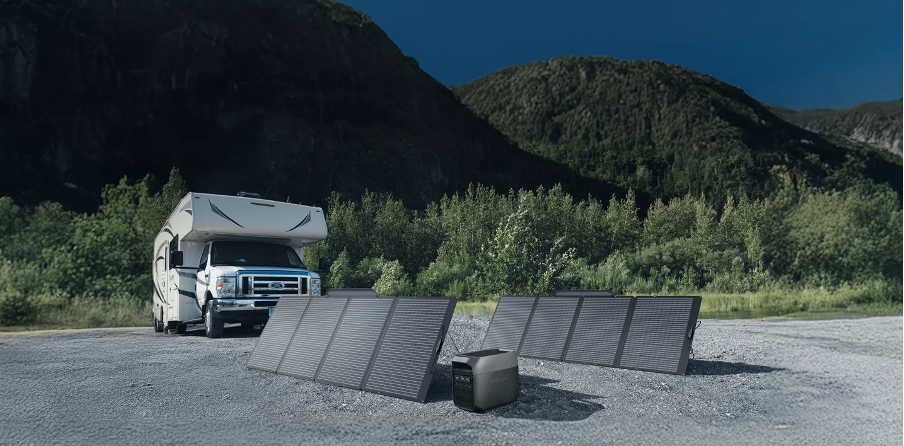
Pairing solar panels with a power station lets you recharge off the grid using nothing but sunlight. Whether you camp in remote areas, live in a van, or want emergency backup at home, solar extends your runtime indefinitely.
But plugging a panel into a station and hoping for the best leaves performance on the table. Panel angle, cable compatibility, charge controller type, and weather conditions all affect how fast your battery fills up.
This guide walks through every step from gear selection to final connection — so you get the fastest, safest solar charge your power station can deliver. No guesswork, no wasted sunlight, and no damaged equipment.
Why Solar Charging Changes the Game
A wall outlet charges your power station fastest, but it keeps you tethered to the grid. Solar panels break that dependency entirely. Once you own a compatible setup, every recharge costs zero dollars and produces zero emissions — a permanent upgrade to your power system.
- Free energy after the initial panel investment
- Silent charging with no fuel, fumes, or moving parts
- Unlimited recharge cycles as long as the sun is shining
Choosing a power station with built-in MPPT solar input makes the process seamless. MPPT controllers convert panel voltage more efficiently than older PWM technology, squeezing up to 30% more usable energy from the same amount of sunlight.
What You Need Before You Start
The right solar setup starts with compatible gear. Mismatched panels, wrong cables, or insufficient solar input capacity lead to slow charging — or no charging at all. Before buying anything, confirm these three components match your equipment.
Choosing the Right Solar Panel
Monocrystalline panels offer the best efficiency per square foot and perform reasonably well in partial shade. For portable use, foldable panels between 100W and 400W strike the right balance of output and portability. Match the panel wattage to your power station’s maximum solar input rating.
Cables and Connectors
Most portable solar panels use MC4 connectors as the industry standard. Some stations require a proprietary adapter cable between the MC4 output and the charging port. Always check which cable your specific model needs before heading out — ordering the wrong adapter after arriving at camp wastes an entire trip.
Checking Your Station’s Solar Input Specs
Every power station lists a maximum solar input wattage in its spec sheet. Exceeding it wastes panel capacity you paid for. Falling far below it means slower charging than necessary. A 200W panel connected to a unit rated for 400W solar input works fine but charges at half speed.
Step-by-Step Setup Guide
Once you have all compatible gear in hand, the actual setup takes less than ten minutes. Follow these four steps in order for the fastest and safest possible solar charging experience.
Step 1 — Position Your Panels
Place panels in direct sunlight on a flat or angled surface facing the sun. Tilt toward the sun’s position — roughly 30–45 degrees in most latitudes during summer. Avoid placing panels on dark surfaces like asphalt, which radiate excess heat and reduce efficiency.
Step 2 — Connect to Your Power Station
Run the solar cable from the panel’s MC4 output to your power station’s solar input port, using any required adapters. The station should detect incoming power and begin charging. Most units display incoming wattage on the built-in screen or in the companion app.
Step 3 — Monitor the Charge
Check the incoming wattage once the connection is live. If the number falls well below your panel’s rated output, adjust the angle or look for shade covering part of the surface. Even a single shadow across one cell can reduce total output by 30% or more.
Step 4 — Disconnect and Store
When charging is complete, disconnect the solar panel from the cable first (or cover the panels/turn them away from the sun) to prevent arcing, then disconnect the cable from the station, then fold or cover the panels. Store panels in a padded case to prevent scratches on the glass surface. Avoid leaving equipment exposed to rain or heavy dew overnight to extend its working life.
How Long Solar Charging Takes
Charging time depends on panel wattage, sunlight intensity, and your power station’s maximum solar input capacity. A 200W panel in full sun delivers roughly 160–180W of real-world output after efficiency losses from heat, angle, and cable resistance. Cloud cover, panel orientation, and ambient temperature all reduce that number further.
| Panel Wattage | Station Capacity | Estimated Full Charge |
| 100W | 500Wh | 6–8 hours |
| 200W | 1,000Wh | 6–7 hours |
| 400W | 1,000Wh | 3–4 hours |
| 400W | 2,000Wh | 6–8 hours |
Factors That Speed Up or Slow Down Charging
Several variables determine your real-world solar charge rate, and understanding them helps you plan charging sessions around the best available conditions. Keep these three factors in mind before positioning your panels:
- Time of day — midday sun delivers peak output
- Cloud cover — even light clouds cut efficiency 20–30%
- Panel temperature — best performance between 50°F and 85°F
Direct midday sun delivers the highest wattage. Morning and evening hours drop output by 30–50%. Extreme heat reduces efficiency — panels perform best when the panel surface temperature is below 85°F. Note that the panel’s surface temperature is often significantly higher than the ambient air temperature, so keep panels well-ventilated to manage heat. For the fastest charge, target the four-hour window around solar noon and keep panels elevated for airflow.
Common Solar Setup Mistakes
Most solar charging problems trace back to avoidable setup errors rather than equipment failure. Fixing these before you deploy saves time, protects your gear from damage, and gets you closer to the maximum charge rate your panel and station combination can deliver.
Placing Panels in Partial Shade
Shade across even a small section of a solar panel can cut total output by 50% or more. Solar cells wired in series pass current sequentially — one shaded cell bottlenecks the entire array. Before connecting, scan the full surface and reposition until every cell sits in direct sunlight.
Using Incompatible Cables or Adapters
Connecting a panel with the wrong cable type or gauge can create resistance that slows charging or overheats connectors. Always use the cable specified by your power station’s manufacturer. If you need a third-party adapter, confirm it matches the voltage and amperage ratings of both the panel and the unit.
Ignoring Temperature Effects on Output
Solar panels lose roughly 0.3–0.5% efficiency per degree Celsius above 25°C. On a hot 40°C day, that means a 5–8% drop in output. Elevate panels off hot surfaces to allow airflow underneath and reduce heat buildup. In cold weather, panels perform better — but batteries may charge slower below freezing.
Getting the Most From Your Solar Setup
The best solar charging results come from pairing high-efficiency panels with a power station built for solar input. EcoFlow’s DELTA and RIVER series support high-wattage MPPT solar charging, rapid wall recharge as backup, and an app that displays real-time solar input so you can adjust panel angle on the fly.
A well-matched setup turns sunlight into reliable, free energy for every trip and every outage. Once dialed in, your solar system recharges itself daily with zero cost, zero noise, and zero dependence on fuel or the grid.
