
Key Takeaways
- Warehouse automation depends on layers of sensors, controllers, and networking hardware working together, not just robots and software.
- Conveyor systems rely on photoelectric and proximity sensors to track items and prevent jams.
- Programmable logic controllers coordinate machinery in real time, often faster than a human operator could react.
- Reliable sourcing of electronics parts keeps replacement and expansion projects on schedule.
- Network infrastructure, not just physical equipment, determines whether an automated facility scales well.
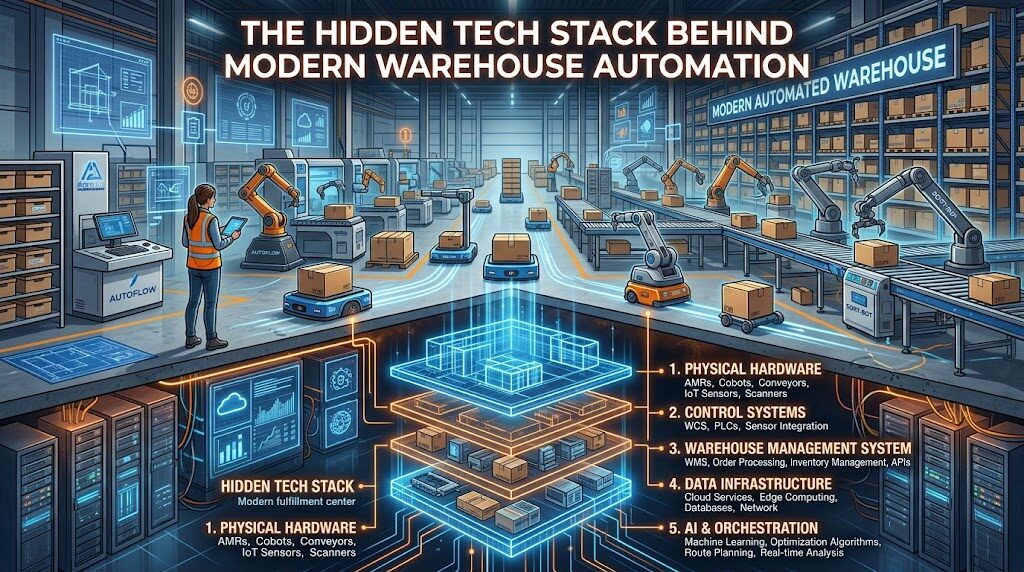
When people picture warehouse automation, they usually picture robots gliding down aisles or a conveyor belt sorting packages at high speed. What they don’t see is the layer underneath: thousands of sensors, controllers, and network connections that make those robots and belts move in sync. A single misfiring sensor or an outdated controller can stall an entire line, and the equipment that keeps everything running rarely gets attention until something breaks.
Sensors Are the Nervous System of the Warehouse
Every automated warehouse is built on a foundation of sensors that constantly report what’s happening on the floor. Photoelectric sensors detect when a package passes a checkpoint. Proximity sensors confirm whether a bin is in position before a robotic arm reaches for it. Weight sensors flag when a pallet is overloaded or underfilled. None of these devices are flashy, but a facility with hundreds of them running at once needs every single one reporting accurate data.
Sensor failures tend to show up as small inconsistencies before they become visible problems. A conveyor that jams intermittently, or a robotic picker that occasionally grabs the wrong item, often traces back to a sensor drifting out of calibration rather than a software bug. Facilities that build in regular sensor checks catch these issues before they cause a full line stoppage.
Controllers Coordinate the Chaos
Programmable logic controllers, or PLCs, sit between the sensors and the physical machinery. They take in constant streams of sensor data and decide, in milliseconds, what a conveyor belt, robotic arm, or sorting gate should do next. A single PLC might manage one section of a line, while a broader system of controllers keeps different zones of the warehouse working together.
This is where the difference between a smooth-running facility and a bottlenecked one usually shows up. Older controllers with limited processing power can create lag between when a sensor detects an issue and when the system responds. Upgrading a controller often solves throughput problems that look, on the surface, like they need a bigger conveyor or an additional robot.
Common Controller Upgrades Worth Considering
- Faster processors that reduce response lag between sensor input and machine action.
- Expanded input and output capacity for facilities adding new sensors or equipment.
- Better diagnostic reporting that flags failing components before they cause downtime.
Networking Hardware Ties Everything Together
None of this equipment works in isolation. Sensors report to controllers, controllers report to a central management system, and that system needs to talk to inventory software, order management, and often a facility’s broader IT network. This requires industrial-grade switches, routers, and cabling built to handle constant data traffic in an environment full of electrical interference from heavy machinery.
Consumer-grade networking equipment rarely holds up in this setting. Industrial facilities need hardware rated for dust, vibration, and temperature swings that a typical office network never encounters. When a facility skips this step and relies on standard networking gear, the failures tend to show up as dropped connections and delayed data, which are much harder to diagnose than a straightforward hardware fault.
Keeping the Stack Running Long-Term
Automated systems age unevenly. A conveyor might run reliably for a decade, while the sensors monitoring it need replacement every two or three years due to constant use. Controllers eventually become obsolete as manufacturers stop supporting older firmware. Planning for this uneven lifecycle matters as much as the initial installation.
- Track the age and failure history of sensors, controllers, and networking equipment by zone.
- Keep a small inventory of common replacement components on-site to avoid production delays.
- Build relationships with suppliers who can provide parts on short lead times, not just during scheduled maintenance windows.
- Test replacement components before installing them in a live production environment.
Warehouse automation only works when facilities can reliably source the electronics parts that keep conveyor sensors and robotic arms in sync. A facility manager who waits until a controller fails to start sourcing a replacement is already behind. Facilities that build sourcing into their maintenance planning avoid the scramble that comes with an unplanned outage.
Where Warehouses Run Into Trouble
- Treating sensors and controllers as maintenance-free once installed.
- Using consumer networking equipment in an industrial setting.
- Waiting until a failure occurs to source replacement components.
- Underestimating how much network bandwidth a growing sensor count requires.
Conclusion
The robots and conveyor belts get the attention, but the sensors, controllers, and networking hardware underneath are what actually keep a warehouse automated system functional day to day. Facilities that treat this layer as seriously as the visible equipment tend to avoid the unplanned downtime that comes from a failed sensor or an outdated controller. Planning for replacement parts and network capacity before they become urgent problems is what separates a warehouse that scales smoothly from one that’s constantly troubleshooting.
