
Spotify is one of the biggest music streaming platforms in the world, offering millions of songs, curated playlists, and podcasts for every mood. But despite its popularity, one limitation still frustrates many users—Spotify doesn’t let you download playlists as MP3 files or listen offline without Premium.
If you’re searching for how to download Spotify playlist for offline listening on any device, this guide gives you everything you need. Whether you want to enjoy Spotify in the car, transfer Spotify playlists to an MP3 player, or keep your favorite music forever, here is the simplest and most effective solution: ViWizard Spotify Music Converter.
Can You Download Spotify Playlists?
Yes — but with limitations. Spotify allows downloading songs, but only under certain conditions:
| Spotify Plan | Offline Download | File Ownership | DRM Restrictions |
| Free | No | No | Yes |
| Premium | Yes | No | Yes |
- Spotify Premium users can download playlists inside the app but still can’t export songs.
- Downloaded songs cannot be played outside Spotify.
- You don’t own the downloaded tracks — if you cancel Premium, all offline songs disappear.
- Spotify downloads are encrypted Ogg Vorbis files, not MP3 or WAV.
However, if you simply want to listen offline within the Spotify app, Spotify Premium provides a built-in offline download option. Below are the official steps.
- Open the Spotify app on your Windows, Mac, iOS, or Android device.
- Log in with your Premium account.
- Find the playlist you want to save.
- Toggle the Download button.
- Wait for the green arrow to appear, which means the playlist is saved offline.
So the question is not just how to download Spotify Playlist, but how to keep Spotify playlists offline forever, without Premium and listen on any device — MP3 players, USB drives, smart TVs, car stereos, or DJ apps.
Best Alternative: Download Spotify Playlist to MP3 Without Premium – ViWizard
If you’re looking for a way to download Spotify playlists without Premium or want to convert Spotify songs to MP3 format, the most effective solution is to use a Spotify music converter. One reliable choice used by many music lovers is ViWizard Spotify Music Converter.

This smart tool allows you to download entire Spotify playlists and convert them into popular audio formats such as MP3, AIFF, WAV, FLAC, M4A, and M4B. Unlike the Spotify app, ViWizard does not restrict your downloaded songs—you can play them offline on any device and keep them forever even without a Spotify subscription.
ViWizard is designed for both Free and Premium users, making it accessible to everyone. It preserves the original sound quality (up to 320kbps) and keeps all important music information like song titles, album artwork, and ID3 tags. The conversion process is fast and easy, even for beginners. Whether you want to transfer songs to a USB flash drive, use music in video editing software, or listen offline on any MP3 player, ViWizard makes it simple and flexible.
Why Choose ViWizard Spotify Music Converter?
- No Spotify Premium required
- Simple drag-and-drop interface
- Ultra-fast 10X conversion speed
- Keeps full audio quality
- Batch converts full playlists or albums
- 100% safe and clean software
- Works on both Windows and Mac
How to Download Spotify Playlist to MP3 Using ViWizard (Step-by-Step)
Step 1: Install ViWizard Spotify Music Converter

Download ViWizard Spotify Music Converter from the official website and install it on your PC or Mac. When you launch ViWizard, the Spotify’s built-in web player will open automatically. Then, log in to your Spotify account.
Step 2: Add Spotify Playlist
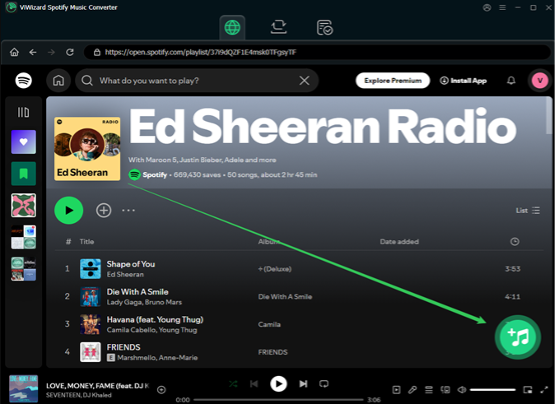
Browsing your music library, select a playlist, album, or songs, open them and drag them to the ViWizard + button. You can click the + button to import.
Step 3: Choose Output Format
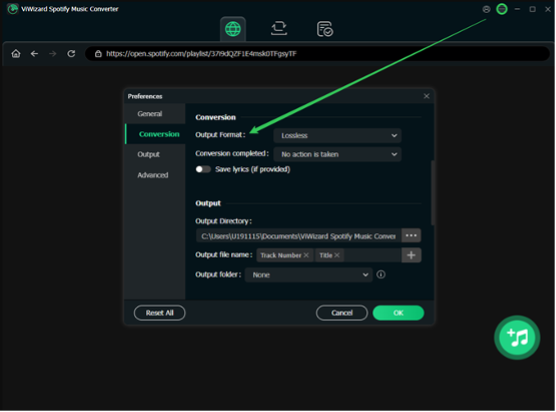
Open the menu bar ? Preferences ? Convert and choose MP3 as the output format. You can customize bitrate (up to 320kbps), sample rate, and output folder for your Spotify songs.
Step 4: Start Downloading

Click the Convert button. ViWizard will download and convert your Spotify playlist within minutes. Once the process finishes, the tracks of Spotify are downloaded to your computer and open the history or output folder to access your offline music files. Now your songs are downloaded locally and can be played on any device—phone, iPod, MP3 player, car stereo, USB drive, or smart TV.
Is It Safe to Download Spotify Playlist?
Yes—as long as you use a clean, trusted desktop tool like ViWizard. Many online “free Spotify downloaders” claim to work but often fail after a few songs, contain malware or intrusive ads, compress quality badly, or do not support playlists. ViWizard is secure, ad-free, and trusted by thousands of users worldwide. It focuses on legal personal use only, so you can safely download Spotify music for offline listening.
What Can You Do with Downloaded Spotify Playlists?
Once your Spotify playlists are converted to MP3 or other formats, you can:
- Listen offline without Premium
- Build your own music collection
- Transfer music to USB/SD cards
- Play music on car players or home speakers
- Use songs in video editing or podcast production
- Import music into DJ software like Serato, Virtual DJ, or Rekordbox
- Play offline on devices like iPod, Android phones, or MP3 players
FAQ – How to Download Spotify Playlist
Q1. Can I download Spotify playlist without Premium?
Yes. With ViWizard you can download Spotify playlists even if you use a free Spotify account.
Q2. Is it legal to download Spotify playlists?
Yes—for personal use only. Do not share or distribute the downloaded music commercially.
Q3. Can ViWizard keep original quality?
Yes. ViWizard supports high-quality conversion and keeps ID3 tags.
Q4. Can I download Spotify playlist to MP3 on Mac and Windows?
Yes. ViWizard works on recent Windows and macOS versions.
Q5. Can I transfer downloaded playlists to my iPhone or Android?
Yes. After conversion, copy the files to your phone like normal music files.
Final Thoughts
If you’re looking for how to download Spotify playlist easily and safely, your choice depends on your goal. For simple offline listening inside Spotify, use Spotify Premium. If you want to download Spotify playlists as MP3 and keep them forever, use ViWizard Spotify Music Converter. Unlike other tools, ViWizard lets you download playlists without Premium, save songs forever, play offline anywhere, and enjoy original audio quality.
Music should be free to enjoy, not locked behind DRM. ViWizard helps you take control of your music for legal, personal use.
Now, try ViWizard Spotify Music Converter and keep your playlists—your way.
