

For music lovers, Apple Music represents a paradise of over 100 million songs, curated playlists, and high-fidelity audio. It’s a seamless ecosystem for listening. However, this paradise has walls—Digital Rights Management (DRM). These locks prevent you from truly owning your favorite tracks, tying them exclusively to the Apple Music app and its subscription model.
What if you want to listen to that meticulously crafted playlist on your FLAC-compatible Hi-Res audio player, burn a CD for your car, or simply preserve your music library beyond a monthly fee? This is where a specialized tool like the ViWizard Apple Music Converter becomes indispensable. It’s the key that unlocks the Apple Music library, allowing you to convert your streams into universal, high-quality FLAC files.
Understanding the “Why”: The Limitations of Apple Music
Before diving into the solution, it’s crucial to understand the problem. Apple Music uses a protected format (M4P with DRM) to safeguard the rights of artists and labels. While understandable, this creates several frustrations for the end-user:
Subscription Dependency: Your entire music library vanishes if you stop your monthly payments. You are renting music, not buying it.
Platform Lock-In: You can only play Apple Music tracks within authorized Apple apps and devices. You cannot transfer them to non-Apple devices like many dedicated MP3 players, Android-based audio players, or other media software.
Limited Audio Formats: While Apple Music offers Lossless and Hi-Res Lossless audio, these are streamed within their ecosystem. You cannot download these tracks in their lossless quality for offline, permanent use on other devices.
This is where the desire for a free, permanent, and flexible collection arises. The goal is to convert Apple Music to FLAC, and for that, you need a powerful and reliable converter.
What is ViWizard Apple Music Converter?
ViWizard Apple Music Converter is a professional desktop software designed for one primary purpose: to remove DRM protection from Apple Music, Apple Podcasts, and Audiobooks, and convert them into a variety of common, DRM-free audio formats.
Its standout feature is the ability to output audio in FLAC (Free Lossless Audio Codec), among other formats like MP3, AIFF, WAV, and M4A. ViWizard acts as a bridge, allowing the audio data from the Apple Music app to be recorded, processed, and saved as a new, unprotected file on your computer, all while preserving the original sound quality.

Why Convert Apple Music to FLAC with ViWizard?
Choosing ViWizard for this specific task is a decision based on its robust feature set, which directly addresses the needs of audiophiles and practical users alike.
-
Genuine FLAC Output for Lossless Quality
FLAC is the gold standard for lossless audio compression. Unlike MP3, which discards audio data to reduce file size, FLAC compresses audio without any loss in quality. When you use ViWizard to convert an Apple Music track, it captures the audio stream at the highest possible quality and encodes it into a perfect FLAC replica. This means you get a file that is identical to the original source, perfect for critical listening on high-end equipment.
Can Apple Music Play FLAC?
This is a common and critical question, and the answer highlights the very reason tools like ViWizard are essential. No, the Apple Music app itself cannot play standard FLAC files.
Apple has its own ecosystem of lossless audio. While Apple Music streams songs in its proprietary Apple Lossless Audio Codec (ALAC)—which is also lossless—it does not support the playback of externally added FLAC files within its library. If you download a FLAC file from the internet or create one yourself, you cannot import it into Apple Music on your iPhone, Mac, or iPad for playback. This closed environment is a primary driver for converting from Apple Music to FLAC, not the other way around.
-
Preserves Original ID3 Tags and Metadata
A common headache with audio conversion is losing track information. ViWizard intelligently and automatically preserves all metadata, including song title, artist, album, genre, track number, and even the album art. This saves you countless hours of manual organization, ensuring your new FLAC library is as tidy and searchable as your original iTunes or Apple Music library.
-
100% Original Quality at 30X Conversion Speed
ViWizard is engineered for efficiency. It doesn’t just record in real-time; it can accelerate the conversion process up to 30 times faster than the song’s actual length. This means a 3-minute song can be converted and saved as a FLAC file in just seconds, without any compromise on the integrity of the audio data.
-
Unmatched Versatility and Usability
The software is not limited to just Apple Music. It can also handle audio from the iTunes app and Audible audiobooks. Its user interface is intuitively designed, making the conversion process a simple four-step operation:

Step 1: From it’s official website, download and install the ViWizard software on your Mac or Windows computer.

Step 2: Open ViWizard and log in to your Apple Music account in the built-in Apple Music web player. Then, select the desired tracks to import into ViWizard.
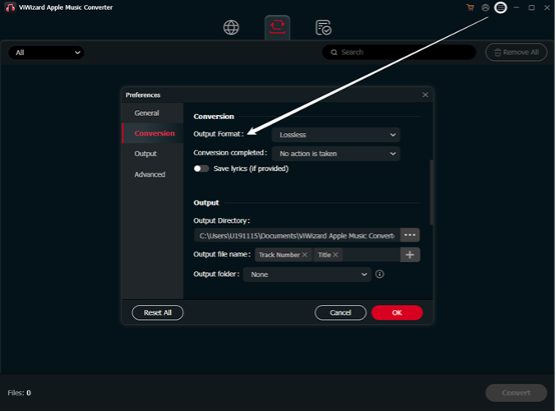
Step 3: Click the panel: menu > preferences. Select FLAC as the output format, and adjust bit rate, sample rate, or codec as needed. Then, Decide where you want the converted files to be saved.

Step 4: Hit the Convert button. ViWizard will quickly convert Apple Music to FLAC while preserving full audio quality. Finally, locate the converted Apple Music local files on your device, then you can enjoy them freely.
Conclusion: Your Gateway to a Truly Open Music Library
Apple Music is a fantastic streaming service, but its locked-down nature conflicts with the desire for true ownership and flexible, high-fidelity listening. ViWizard Apple Music Converter elegantly solves this problem. It is a specialized, powerful, and user-friendly tool that empowers you to break free from digital limitations.
By converting your Apple Music streams to the lossless FLAC format, you are not just changing a file extension; you are investing in a lifetime of unparalleled audio quality and listening freedom. You are building a music collection that you truly control, ready to be enjoyed on any device, anywhere, forever.
Stop renting your music and start owning it. Explore the potential of your audio library today with ViWizard.
