

Hulu is one of the most popular streaming services, but if you live in a big family or share your account with others, you may have come across the frustrating “too many streams” error. This often leaves people wondering: How many TVs can watch Hulu at the same time?
In this guide, we’ll break down Hulu’s official streaming limits, explain the differences between its plans, and share a professional video downloader to save Hulu videos so that you can enjoy Hulu shows and movies without worrying about device restrictions.
Part 1. Overview of Hulu
Hulu is a popular streaming platform with a vast selection of TV shows, movies, and exclusive Hulu Originals. With a standard subscription, you can watch thousands of titles on demand anytime. If you want even more content, you can opt for Hulu + Live TV, which includes sports, news, and various live channels.
However, when watching shows with family and friends, there’s one important thing to note—Hulu has restrictions on the number of devices that can stream simultaneously. If you’re unaware of these rules, you may encounter the “Too many devices are streaming” error message.
Part 2. How Many TVs Can Watch Hulu on the Same Account?
By default, a standard Hulu subscription allows you to stream on two different screens at the same time. This limit applies whether you’re watching on two TVs, a TV and a phone, or a computer and a tablet. If you try to stream on a third device, you’ll receive an error message.
For Hulu + Live TV subscribers, there is an option to upgrade. For an extra fee, you can get the Unlimited Screens Add-on. This allows you to stream on any number of supported devices within your home network. Additionally, you can stream on up to three separate mobile devices while you’re away from home.
Part 3. How to Watch Hulu Offline Without Device Limitations?
The two-screen limit can be a real problem for larger families or friends who share an account. The official Hulu app only allows downloads on mobile devices for “No Ads” subscribers, and even those downloads are temporary.
A great way to bypass these restrictions and watch Hulu on as many TVs or devices as you want is by downloading the videos directly. By doing this, you’re not streaming, so you don’t have to worry about the two-screen limit. You can download the content to your computer and then transfer it to a USB drive or an external hard drive to play on any TV.
One highly-rated tool for this is Keepix Video Downloader. It lets you save Hulu shows and movies as permanent MP4 files, which you can then watch on any device without an internet connection.
How to download from Hulu via Keeprix Video Downloader:
Step 1. Download and Install Keepix Video Downloader and launch it on your computer.
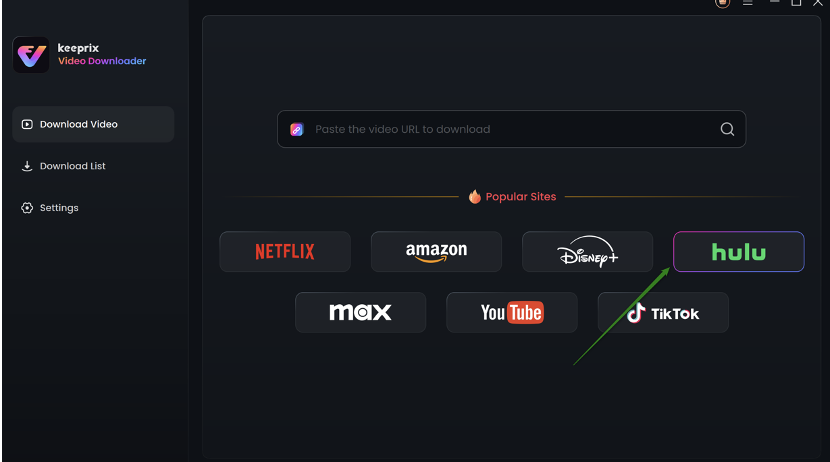
Step 2. On the main interface, click the “Download Video” option and select Hulu.
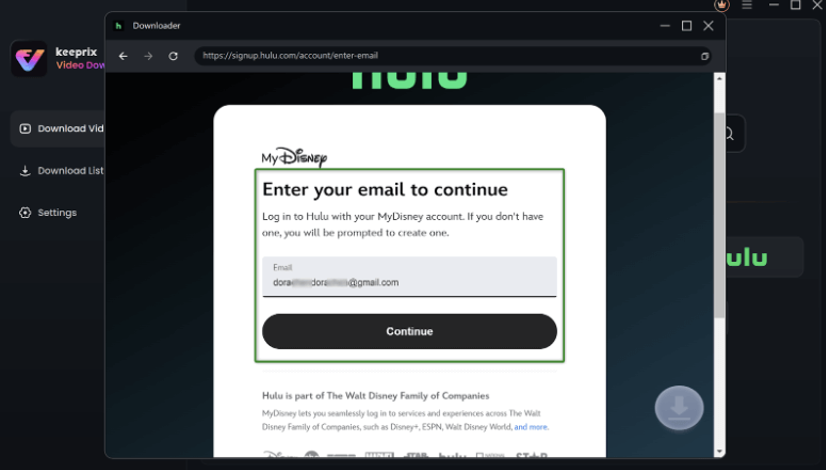
Step 3: You will be redirected to the Hulu built-in browser homepage within the Keeprix. Click “SIGN UP FOR HULU ONLY. ” Now, use your MyDisney account and log in to Hulu.
Step 4: Enter keywords in the search bar or paste the Hulu video link directly into the address bar.
Step 5: Open the video playback page or video details page once the search results appear. Click the Download icon at the bottom right corner.

Step 6: Keeprix will start downloading your Hulu video. Monitor the download progress in the Download List.
Part 4. Conclusion
In 2025, Hulu’s basic subscription still allows streaming on a maximum of two TVs or devices at once. For live TV subscribers, the Unlimited Screens Add-on is an option, but it comes at an extra cost. A more flexible and long-term solution is to download your favorite content using a tool like Keepix Video Downloader. This method not only bypasses the device limit but also lets you build a personal library of your shows, so you can watch them forever, with or without a Wi-Fi connection.
