

From Static Ideas to Short-Form Video Content
Short-form video has become a dominant format across platforms like TikTok, YouTube Shorts, and Instagram Reels. Yet for many creators, marketers, and indie developers, producing video content still feels more complex than it should be. Traditional editing tools often require time, experience, and a clear understanding of timelines, transitions, and effects.
AI video generator is beginning to change this workflow. Instead of manually assembling clips, users can now start with what they already have—text descriptions or images—and let AI handle motion, lighting, and visual coherence.
A Practical Scenario: Creating Social Media Videos from Text or Images
Consider a common scenario: a creator wants to test several short video ideas for social media. They may have a written concept, a piece of promotional copy, or a single visual asset, but not the time to build full videos from scratch.
In this context, AI tools that support Text-to-Video and Image-to-Video workflows become particularly useful. By describing a scene in text or uploading a static image, users can generate short video clips with motion, depth, and atmosphere—suitable for fast iteration and experimentation.
How Text-to-Video and Image-to-Video Work in Practice
Modern AI video generators generally support two complementary approaches:
Text-to-Video
Users input a text prompt describing the scene, subject, action, and visual style. The AI interprets this description and generates a video sequence that matches the intent. This approach works well for storytelling, concept previews, or transforming written ideas into visual narratives.
Image-to-Video
Instead of starting from text, users upload an image—either a photograph, illustration, or AI-generated artwork. The system then adds natural motion, depth of field, lighting changes, camera drift, and even ambient effects, turning a single frame into a dynamic scene. This image to video conversion allows creators to quickly animate still graphics, with tools such as Magic Hour providing additional options for controlling motion dynamics.
Platforms such as PicLumen combine both methods, allowing creators to switch freely between text-driven and image-driven workflows depending on the project.
The Role of Multiple AI Video Models
One of the challenges in AI video generation is that different creative goals require different visual characteristics. Some projects benefit from cinematic motion and realistic lighting, while others are better suited to stylized or animated outputs.
To address this, PicLumen integrates multiple advanced AI video models, including:
- Kling 2.6 – Optimized for fast, eye-catching short videos, particularly for platforms like TikTok and Reels
- Sora 2 – Focused on cinematic visuals, smooth camera movement, and narrative flow
- Veo 3.1 – Designed for highly realistic video generation, with detailed textures, lighting, and natural audio elements
- Hailuo 2.3 – Well-suited for illustration and anime-style visuals, offering soft motion and expressive animation

This multi-model approach allows users to choose outputs that better align with specific platforms or creative styles, rather than relying on a single visual pipeline.
Style Control and Format Flexibility
Beyond model selection, AI video creation often depends on how much control users have over style and format. Tools like PicLumen allow creators to define visual aesthetics through text prompts or predefined styles, such as cinematic, sci-fi, 3D animation, pixel art, or pop art.
Support for multiple aspect ratios—such as 1:1, 9:16, and 16:9—also makes it easier to adapt videos for different distribution channels without re-editing content.
A Simple Workflow for AI Video Creation
A typical AI video creation process follows a straightforward structure:
- Choose an AI video model based on the desired visual outcome
- Enter a text prompt or upload an image
- Select aspect ratio, duration, and style preferences
- Preview multiple generated versions
- Export the final video in high definition
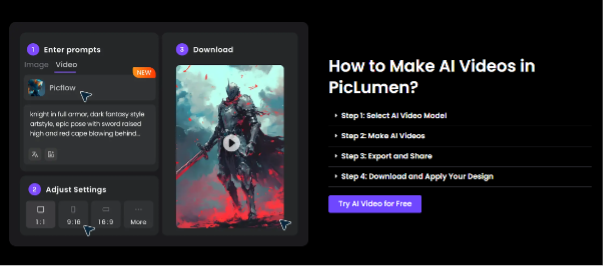
This approach reduces technical barriers and allows creators to focus more on ideas than execution.
Accessibility and Experimentation
For users who want to explore AI video creation without immediate commitment, PicLumen offers a system of daily free credits, allowing creators to test features and workflows at no cost. While free usage comes with certain limitations, it lowers the entry barrier for experimentation and learning.
Final Thoughts
AI video generation is steadily becoming part of everyday creative workflows. By transforming text and images into motion-based content, these tools make video creation more approachable for a wider audience.
For creators working across marketing, social media, entertainment, or game-related content, platforms like PicLumen illustrate how AI can support faster ideation, visual exploration, and flexible production—without replacing creative intent.
