

Choosing a 4K Projector for a Bright Living Room: What Actually Matters
Key Takeaways
- The rated lumen figure is peak output, not what you’ll watch at. The everyday movie mode is often half that number. Find it before comparing models.
- Controlling direct sunlight beats buying more lumens. Curtains and window direction can recover more image quality than a projector upgrade.
- A bigger screen makes any projector effectively dimmer. Brightness spreads across the projected area. Confirm throw distance and zoom range before buying.
- Native contrast matters more than dynamic contrast under room light. Ambient light raises your black floor, and a higher native ratio is what actually helps.
For a bright living room, choose a 4K projector by matching verified brightness to your ambient light and screen size, then check contrast, color mode, optical placement, fan noise, and streaming support. A peak-lumen figure alone is not enough.
Most searches for a bright-room projector begin with one question: how many lumens do you need? The answer matters, but brightness alone doesn’t explain why a 6,000-lumen projector can still look flat in an afternoon living room. Screen size, picture mode, contrast, lens placement, and fan noise all shape what that number actually delivers in your space.
Map the Ambient Light in Your Living Room
Before you look at a single number, spend ten minutes observing your room at the times you actually plan to watch.
- Window direction and size. South- or west-facing windows receive direct sun for several hours each day. North-facing rooms get diffuse daylight that is far easier to manage.
- Direct vs. scattered light. Direct sunlight hitting the projection wall is the hardest condition for any projector; scattered light from a cloudy sky or a room where the sun enters from the side is more manageable.
- Artificial lighting. Recessed ceiling lights above the screen wash out the image more than floor lamps to the side.
- Your main viewing times. Evening with the curtains drawn and a Sunday afternoon with the blinds half open put very different demands on brightness, even in the same room.
Based on those observations, sort your room into one of three bands:
| Room condition | Characteristics |
| Controllable light | Blackout blinds available; evening-primary use; artificial light can be dimmed or redirected |
| Moderate ambient light | Curtains present but not blackout; mixed day and evening use; some ceiling light unavoidable |
| Strong daytime light | Large south/west windows; afternoon use common; direct sun possible on the projection wall |
A projector that looks great in a controllable-light room may look acceptable in a moderate room and genuinely poor in a strong-daylight room. Prioritize controlling direct sunlight before raising your brightness budget; curtains and screen placement often do more than an extra thousand lumens.
Compare Brightness Against Your Screen Size and Picture Mode
Compare Brightness Ratings in Context
Projector brightness is measured in lumens, but not all lumen ratings are produced the same way. The two most common standards you will encounter are ANSI lumens and ISO lumens, and they use different test procedures. Mixing them in a direct comparison (for example, treating an ISO-rated figure as equivalent to an ANSI-rated figure) leads to purchasing mistakes.
More practically: many projectors have multiple picture modes, and the headline brightness figure is almost always the maximum the hardware can achieve; that is not what it runs at during a typical movie. Before comparing two models on lumens, check:
- Which mode produced the rated output (e.g., “Peak Output,” “Conference Mode,” “Standard,” “Movie”)
- Whether that mode also affects color accuracy or fan speed
- What the output is in the mode you will actually use most
A projector rated at 6,000 ANSI lumens in its brightest mode may produce 3,000 ANSI lumens in its default everyday mode. Understanding it lets you compare accurately. For a deeper look at how brightness standards affect real-world viewing, the projector brightness guide walks through ANSI ratings across different usage scenarios.
Match Brightness to Screen Size and Surface
Once you have a calibrated sense of a projector’s real-world output, factor in screen size. A projector spreads a fixed amount of light across the projected area. Stretching a 100-inch image to 150 inches increases the screen area by more than twice, which means the brightness per square foot drops substantially, even though the projector’s rated output has not changed.
This is why buying decisions cannot be made on lumens alone. You need to know:
- Your target image diagonal
- The throw distance available in your room
- The projector’s zoom range and whether it can reach your target size from that distance
Use a tool like the ProjectorCentral Projection Calculator to verify any specific model against your room dimensions before purchasing. A projector that cannot produce your target image from your available throw distance is not the right choice, regardless of its brightness rating.
Do Not Trade Away Contrast, HDR, and Color
Brightness determines whether you can see an image in ambient light. Contrast determines whether that image has depth, texture, and life, or looks flat.
In a bright living room, ambient light reduces perceived contrast by raising the black floor: the “black” areas of your image are not truly black, because room light is bouncing off the screen. A higher native contrast ratio gives the projector more depth to work with before ambient light degrades the result. When comparing contrast figures, note:
- Native contrast ratio measures the difference between the brightest white and darkest black the projector can produce in a single static frame.
- Dynamic contrast ratio reflects how the projector can shift its light output between very bright and very dark scenes over time, typically using an iris or dimming algorithm.
These two numbers serve different purposes and should not be added together or treated as interchangeable. A projector with a strong native contrast ratio will hold up better under ambient light than one that relies entirely on dynamic adjustment.
For HDR and color: check which formats the projector supports (HDR10, Dolby Vision, HLG) and in which mode it delivers its best color. A wide color gamut quoted in a maximum-brightness mode may not carry over to the mode you actually watch in.
Check Lens and Placement Flexibility
Start with throw ratio: the relationship between projector distance and image width. Most standard-throw projectors need roughly 1.2 to 1.5 times the image width as throw distance. If your living room only allows the projector to sit 10 feet from the wall, verify that the model can produce your target screen size from that distance.
A 1.5× or larger optical zoom range lets you adjust image size without moving the projector, and, critically, without degrading image quality. Digital zoom crops the native resolution, so it should not be your primary sizing tool.
Two additional features reduce installation complexity in multipurpose living rooms:
- Lens shift or motorized gimbal lets you adjust the projected image up, down, or sideways without tilting the projector body, which avoids keystone distortion.
- Auto-alignment and AI spatial adaptation scans the projection surface and corrects image geometry automatically, which is useful when the projector cannot be placed in a perfectly centered position.
Models with 1.5× or greater optical zoom give you more flexibility when the throw distance is fixed and moving the projector is not an option; confirm the upper limit when comparing any 4K projectors on your shortlist.
Account for Noise, Audio, and Everyday Streaming
Fan noise. High-brightness projectors run hotter, which requires more aggressive cooling. A projector measured at 28 dB in standard mode may operate at significantly higher dB in its peak-brightness mode. 28 dB is roughly the ambient noise of a quiet room; 43 dB is closer to a low conversation. In a shared living room, the difference is noticeable during quiet dialogue scenes.
Built-in audio. Adding a separate soundbar or speaker system to a projector setup is straightforward, but it adds cost, cables, and setup friction. If you want a simpler living room setup, check the built-in speaker wattage and format support (Dolby Audio, DTS, etc.) before assuming you will need external audio.
Streaming and connectivity. A projector running Google TV or similar gives you access to streaming apps natively, without a separate dongle or streaming stick. Verify that the platforms you actually use (Netflix, Disney+, Prime Video) are available in certified 4K on the built-in OS, not just 1080p.
A Practical Bright-Living-Room Example: Anker soundcore Nebula X1S
If your living room has moderate to strong ambient light, your target screen size is around 100 to 150 inches, and you prefer an all-in-one setup over a separate AV receiver, the Anker soundcore Nebula X1S 4K Projector is a well-documented option worth putting on your shortlist.
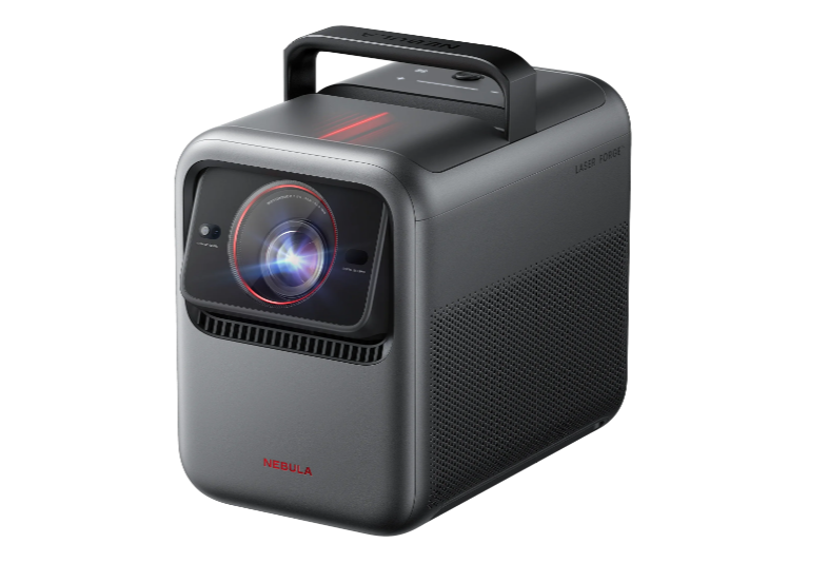
Brightness modes:
- Nebula Master Mode (default): 3,000 lumens, 28 dB (average sound level measured in Standard Mode at 1 m) — the everyday setting for movies and TV
- Conference Mode (peak): 6,000 ANSI lumens, approximately 43 dB — for bright-room visibility or presentations where noise is less critical
- Vivid Mode: Vivid Mode delivers optimal color accuracy at 106% Rec.2020.
These three modes involve different trade-offs. Running Conference Mode at 6,000 ANSI lumens raises fan noise to approximately 43 dB; switching to Vivid Mode shifts the priority to color accuracy at 106% Rec.2020 coverage.
- Contrast: The X1S uses a 6-blade dynamic iris and the NebulaMaster algorithm to deliver a native contrast ratio of 5,000:1, with dynamic contrast reaching 56,000:1.
- Lens and placement: A 14-element all-glass lens maintains focus and sharpness at the edges across extended use. The 1.67× optical zoom lets you resize the image without moving the projector. AI Spatial Adaptation handles geometry correction in one tap, and Spatial Recall saves your room settings so the projector restores them automatically.
- Everyday use: 40W built-in speakers with Dolby Audio, Google TV with certified 4K Netflix and Dolby Vision, and a maximum screen size of 300 inches, though that upper limit applies under controlled conditions and is not a recommendation for a bright living room.
Quick Buying Checklist
Before finalizing any 4K projector purchase for a bright living room, confirm:
- Room light: Mapped window direction, peak ambient light hours, and whether direct sun can be blocked
- Target screen size: Measured the wall and the available throw distance
- Brightness mode: Identified which mode produces the rated output and what the everyday-use output actually is
- Contrast and HDR: Compared native (not only dynamic) contrast; confirmed HDR format support
- Throw and zoom: Verified the projector can reach your target size from your available distance, using optical (not digital) zoom
- Fan noise: Checked dB level at the brightness mode you plan to run most often
- Audio and streaming: Confirmed built-in audio is adequate or planned for external audio; verified 4K app support on the built-in OS
Conclusion
Start with the room, not the number. Match verified brightness to how your living room actually behaves, then check contrast, placement, noise, and streaming as a complete picture. A 4K projector for a bright room that holds up across all of those criteria will serve you far better than one that wins on a single headline figure.
FAQ
How many ANSI lumens do I need for a bright living room?
There is no single number that fits every room. The amount of ambient light, screen size, screen surface, and picture mode all affect the result. Compare ratings measured on the same basis, then check whether the quoted output applies to the projector’s everyday viewing mode or only a peak-brightness mode.
Is 4K resolution enough to make a projector look good in daylight?
No. Resolution controls image detail, while ambient light can reduce perceived contrast and wash out dark areas. A daylight-friendly setup also needs appropriate brightness, light control, a suitable screen size or surface, and a picture mode that balances brightness with color.
Does a larger projector screen need more brightness?
A larger image spreads the projector’s light over a greater area, so screen size should be considered alongside brightness. Check the projector’s throw range and zoom limits for your intended image size before buying.
Should I choose the projector with the highest peak-lumen rating?
Not automatically. Check the mode used to produce the rating and what happens to color accuracy and fan noise in that mode. A lower-output everyday mode may be more comfortable for movies, while a peak mode may be useful when visibility is the priority.
Can a projector replace a TV in a sunny living room?
It can provide a much larger image, but direct sunlight remains difficult for projection and can reduce perceived contrast. Treat curtains, blinds, screen choice, and viewing time as part of the system rather than assuming brightness alone will make every room behave like a TV setup.
