
In the age of streaming, Apple Music stands as a titan, offering a vast universe of over 100 million songs, curated playlists, and exclusive radio shows at our fingertips. Its seamless integration with the Apple ecosystem makes it a go-to for millions of users worldwide. Yet, for all its brilliance, a significant limitation remains: the songs you “add” to your library aren’t truly yours. They are locked behind a subscription paywall, encumbered by Digital Rights Management (DRM) protection.
This is where a powerful solution comes into play. If you’ve ever searched for a way to download Apple Music to MP3 for permanent, unrestricted enjoyment, you’re not alone. This comprehensive guide explores the “why” and, most importantly, the “how,” introducing you to ViWizard Apple Music Converter—the key to liberating your favorite tracks.
The Why: Reasons to Convert Apple Music to MP3
Before diving into the solution, let’s clarify the compelling reasons to convert your Apple Music streams into universal MP3 files.
Break Free from the Subscription Model: Your access to Apple Music’s entire catalog is contingent on a monthly fee. Cancel your subscription, and your carefully built library vanishes. Converting songs to MP3 means you own them forever, regardless of your subscription status.
Enjoy True Ownership and Unlimited Playback: DRM restrictions mean you can only play Apple Music songs within the Apple Music app or on authorized devices. Converting to MP3 removes these locks, allowing you to play your music on any device—from ancient MP3 players and non-Apple smartwatches to car stereos and gaming consoles—without any limitations.
Preserve Your Favorite Music Forever: Artists and labels occasionally remove music from streaming platforms. That album or song you love could disappear overnight. By downloading it, you create a personal archive, ensuring you never lose access to the music that matters most to you.
Save on Data and Stream Offline, Truly: While Apple Music offers an “offline” mode, it’s tied to the app and often subject to authorization checks. MP3 files are stored locally on your device, consuming zero data and being 100% reliable in areas with no internet connection, like flights, remote areas, or the subway.
The How: Introducing ViWizard Apple Music Converter
Manually recording audio is a low-fidelity, time-consuming nightmare. The efficient and professional method is to use a dedicated DRM removal tool. This is where ViWizard Apple Music Converter excels.
ViWizard is a sophisticated yet user-friendly software designed for one primary purpose: to legally convert and download songs, albums, and playlists from Apple Music, iTunes, and Audible into common, DRM-free audio files like MP3, FLAC, WAV, and more, while preserving original audio quality and ID3 tags.

Why ViWizard Stands Out as the Premier Choice
The market has several converters, but ViWizard distinguishes itself through a powerful set of features:
- Lossless Quality Conversion: ViWizard doesn’t just strip DRM; it converts your music at up to 10x speed while maintaining the original 100% lossless quality. You can choose from various output parameters, including bit rates up to 320 kbps, ensuring your MP3s sound impeccable.
- Permanent Ownership, Instantly: Once converted, the music files are yours. They are no longer linked to your Apple ID or subscription. Store them on hard drives, burn them to CDs, or share them across your family’s devices—the control is entirely in your hands.
- Preservation of Metadata (ID3 Tags): A huge frustration with many conversion methods is the loss of metadata. ViWizard automatically retains all original information, including song title, artist, album, album art, genre, and track number. Your library remains perfectly organized.
- Blazing Fast 30X Conversion Speed: Efficiency is key. ViWizard’s advanced algorithm allows it to convert entire albums or playlists at speeds up to 30 times faster than real-time playback, saving you hours of waiting.
- Remarkably Simple User Interface: You don’t need to be a tech expert. ViWizard’s intuitive interface is designed for everyone. The process is as simple as drag-and-drop, click convert, and enjoy.
How to Download Apple Music Songs as MP3s:
Using ViWizard is a straightforward, three-step process.
Step 1: Download and Install the ViWizard Software

Begin by downloading the latest version of ViWizard Apple Music Converter from the official website. Install the application on your Windows or Mac computer following the simple on-screen instructions.
Step 2: Sign in to your Apple Music account

Run the ViWizard downloader and you’ll be taken to the built-in Apple Music web player. Click Sign In to enter your Apple Music credentials and you’ll see your entire music library.
Step 3: Add Apple Music Tracks to ViWizard
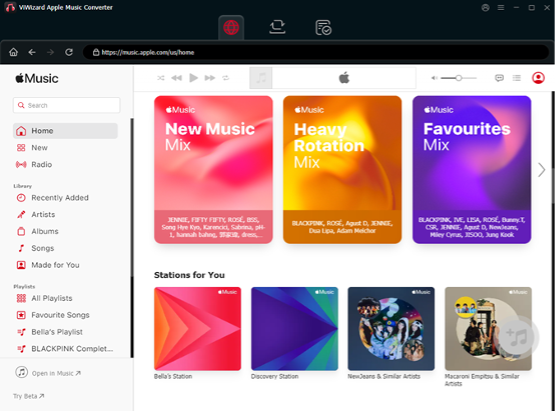
Browse your entire music library and locate the tracks you want to download to MP3 to open. Then, click the + button in the bottom right corner to import them into the conversion task.
Step 4: Configure Output Settings (Choose MP3)
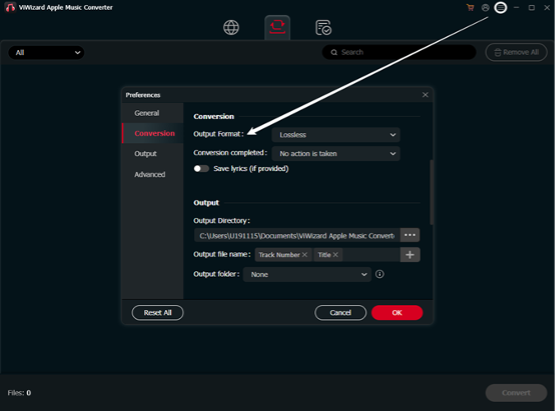
Before converting, navigate to the menu and select “Preferences.” Here, choose “MP3” as your output format. This is also where you can customize the output quality (we recommend 320 kbps for the best balance of size and quality), output folder location, and how you’d like your files organized (e.g., by Artist/Album).
Step 5: Initiate the Conversion Process

With your songs added and settings configured, click the “Convert” button. ViWizard will now work its magic, rapidly processing and downloading tracks of Apple Music to your computer. Once complete, you can click the “Converted” button to find your new, DRM-free MP3 files, ready to be transferred to any device.
Conclusion: Set Your Music Free Today
Apple Music is a fantastic streaming service, but true musical freedom comes from ownership and unrestricted access. The desire to download Apple Music to MP3 is not about circumventing rules; it’s about preserving your personal collection and enjoying your music on your own terms, anywhere, anytime.
ViWizard Apple Music Converter provides the most efficient, high-quality, and reliable method to achieve this goal. It transforms your subscription-based library into a timeless, personal collection that you truly own.
Stop letting your favorite songs be held hostage by a monthly fee. Take control of your music experience.
