Apple gives in – Make Free iPhone Ringtones in Garageband 4.1.1

Posted by: Michael on Dec 14, 2007

garagebandringtons.jpg

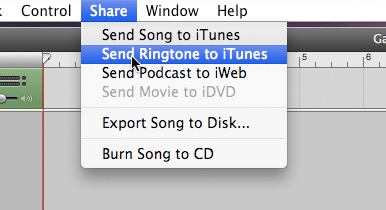
Thankfully, Apple has given in on the ridiculous ringtone limitations of the iPhone. In the latest update of Garageband Apple has added a new way to “share” what your created (or imported and chopped) music. Now you can make custom Ringtones, send them to iTunes and sync them to your iPhone.

Of course, DRMed tracks from iTunes can’t be imported, but you can always burn those to a CD, then re-import them to work around it. Or you can just save the time and pay .99 cents more for the Ringtone feature in iTunes.

It’s your call.


Comments

1
Avatar

Faça seus próprio toques no GarageBand ‘08

December 14th, 2007 at 1:15 pm

[...] acordo com o Apple Gazette, não é possível usar músicas com DRM do iTunes, mas é possível gravá-las em um CD e depois [...]

2
Avatar

Drew

December 14th, 2007 at 1:56 pm

Great, GREAT move. I figured when they restored the ability to hack in custom ringtones with the last update, something like this was on the way.

[...] post by Michael and software by Elliott [...]

[...] unknown wrote an interesting post today onHere’s a quick excerpt [...]

5
Avatar

Slevin

December 14th, 2007 at 5:34 pm

How about a link to the actual support article at Apple.com that might be helpful

[...] unknown wrote an interesting post today onHere’s a quick excerptThankfully, Apple has given in on the ridiculous ringtone limitations of the iPhone. In the latest update of Garageband Apple has added a new way to “share” what your created (or imported and chopped) music. … [...]

[...] unknown wrote an interesting post today onHere’s a quick excerptThankfully, Apple has given in on the ridiculous ringtone limitations of the iPhone. In the latest update of Garageband Apple has added a new way to “share” what your created (or imported and chopped) music. … [...]

8
Avatar

Michael

December 14th, 2007 at 10:48 pm

@Slevin

What kind of help do you need?

It’s just an extra option when you click Share.


Leave a Comment