
SoundCloud is a treasure trove of music, from underground artists and exclusive remixes to DJ sets and podcasts you simply can’t find anywhere else. While streaming is convenient, it ties you to an internet connection. The true freedom lies in having your favorite tracks as MP3 files, ready to play on any device, anytime. This guide will show you the best, safest, and most effective method to download SoundCloud music to MP3, focusing on the powerful ViWizard SoundCloud Music Converter.
Why Download SoundCloud to MP3?
The reasons are endless. You might want to create the perfect offline playlist for a flight, sample tracks for a creative project, or simply build a personal archive of rare mixes that could disappear from the platform at any time. However, SoundCloud doesn’t offer direct MP3 downloads for most tracks, and even with a SoundCloud Go+ subscription, downloads remain locked within the app. This is where a dedicated solution like ViWizard comes in.
The Problem with Free “SoundCloud to MP3” Converters
A quick online search will reveal countless free web-based converters. While tempting, these are often riddled with pop-up ads, malicious software, and severe quality limitations. They force you to upload files to third-party servers, posing privacy and security risks. Plus, the resulting MP3s often suffer from poor bitrates and missing metadata like artist and album names, leaving your music library messy and disorganized.
ViWizard SoundCloud Music Converter: One of the Best SoundCloud Converter
For a superior, secure, and high-quality experience, ViWizard SoundCloud Music Converter is the tool of choice. It operates directly from your desktop (Windows and Mac) and works by converting the audio stream from within its built-in web player. This allows you to download SoundCloud music to MP3 with lossless quality.
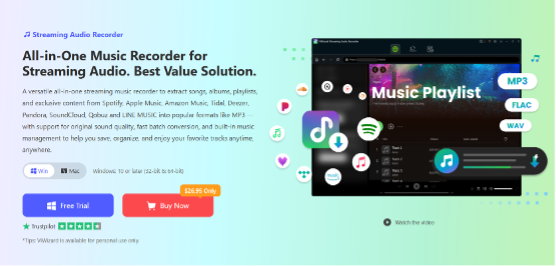
Here’s why ViWizard is the superior option for SoundCloud enthusiasts :
Uncompromising Audio Quality: It lets you download tracks in MP3 with up to 320kbps or in lossless formats like FLAC, WAV, and AIFF, preserving every beat and detail of the original recording.
Preserved ID3 Tags: Your downloaded MP3 files automatically come complete with title, artist, album, and cover art, ensuring your music library stays perfectly organized.
Reliable and Secure: As a desktop application, it doesn’t rely on unstable third-party servers or compromise your computer’s security with hidden malware. It’s a clean and safe way to build your music collection.
Batch Downloading: You can download entire playlists or albums in one go at blazing fast speeds, saving you significant time and effort.
All-in-One Platform: While SoundCloud is a focus, ViWizard also supports other major services like Spotify, Apple Music, Tidal, YouTube Music and Amazon Music, making it a one-stop solution for all your music preservation needs.
How to Download SoundCloud Music to MP3 with ViWizard
Getting your favorite SoundCloud tracks as high-quality MP3s is a simple four-step process.
Step 1: Set Your Output Format
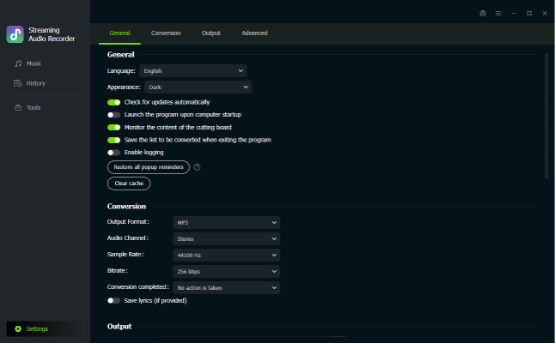
Launch ViWizard and click the button Setting in the lower-left corner to access Preferences. Here, select MP3 as your output format. You can further customize the bitrate and sample rate to your liking, ensuring the highest possible quality for your downloads.
Step 2: Log in to SoundCloud
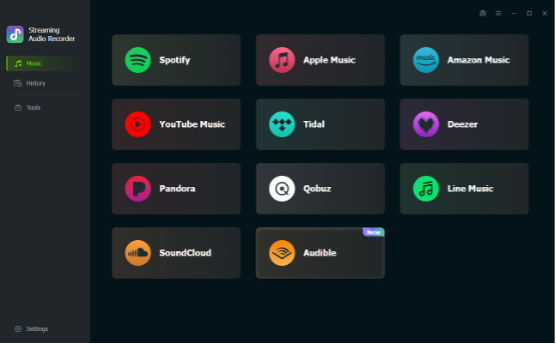
In the main interface, choose SoundCloud from the list of supported platforms. The built-in web player will open. Simply log in to your SoundCloud account to access your library, playlists, and liked tracks.
Step 3: Add Your Music to the Conversion List
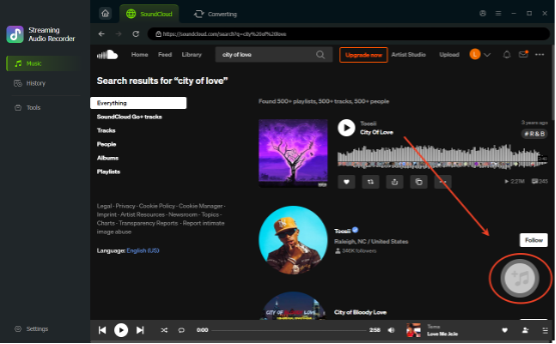
Browse to find the song, album, or playlist you want to download. Once you’ve found it, click the “+” button (usually in the bottom-right corner). This will add all the selected tracks to ViWizard’s conversion queue.
Step 4: Convert and Download
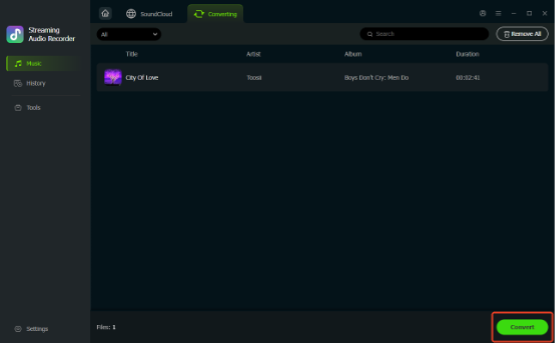
With your music queued, click the Convert button. ViWizard will begin processing your tracks, downloading them as high-quality MP3 files directly to your computer. Once complete, you can find your new MP3s in the output folder you specified in Step 1, ready to be transferred to any device you own.
Conclusion
Free web converters are a risky gamble. For a reliable, high-quality, and secure method, ViWizard SoundCloud Music Converter is the clear winner. It empowers you to take full control of your SoundCloud library, preserving your favorite tracks in pristine MP3 quality. By following the simple steps above, you can build a personal, offline collection of music that’s truly yours and enjoy it anywhere, anytime.
