
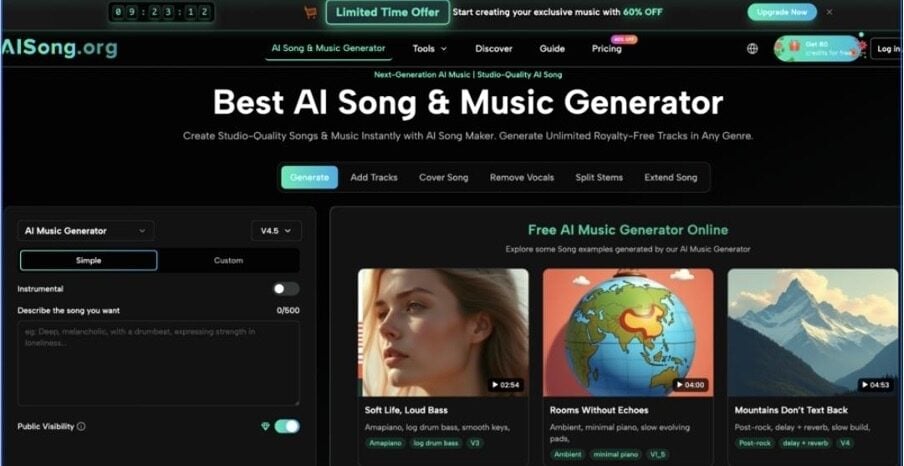
For YouTube creators, one of the hardest parts of publishing consistent, original music is turning a good idea into a fully produced track with vocals and instrumentals that fit your visuals and channel style. AISong’s Add Tracks feature is built to close exactly that gap inside its AI song generator workflow, letting you layer AI vocals onto an existing beat or build a full instrumental around a vocal you already recorded.
Instead of juggling multiple DAWs, plugins, and marketplaces, creators can stay in one browser-based platform, move faster, and keep costs predictable. In this article, you’ll see how AISong’s Add Tracks works, why it matters for YouTube creators, and how to use it step by step to upgrade your music production pipeline. If you already use AI song generator to create base tracks, Add Tracks becomes the missing production layer that turns rough ideas into finished, upload-ready music.
What Is an AI song generator in the Context of Add Tracks?
An AI song generator is an online tool that turns prompts, lyrics, or rough musical ideas into complete songs with melody, vocals, and instrumentals in just a few steps. For YouTube creators, it means you can quickly produce original, royalty-friendly tracks tailored to your channel’s tone without hiring producers or learning complex audio software. In AISong, Add Tracks builds on this foundation by taking those generated ideas—or your own recordings—and turning them into fully arranged songs ready for real-world use.
Problems with the Traditional Way of Handling Add Tracks
Typical Pain Points
- You need to hire vocalists or musicians every time you want to expand an instrumental or finish a rough idea.
- You must learn a full-featured DAW just to arrange and mix simple songs for your channel.
- You face unclear licensing when using sample packs, stock vocals, or marketplace beats.
- Revisions depend on external producers, stretching projects from days into weeks.
- The sound of your channel becomes inconsistent as you mix DIY tracks with outsourced work.
Why Users Start Looking for an AI Solution
As upload schedules accelerate, creators quickly hit a wall where manual production can’t match the volume of videos they want to publish. Short-form clips, multiple series, and branded partnerships all demand more original music while budgets stay tight. An AI-driven workflow like AISong with Add Tracks lets you scale output, keep a consistent sound, and stay fully online, without building a traditional studio pipeline.
How AISong Implements Add Tracks as Part of an AI song generator
What Add Tracks Does in AISong
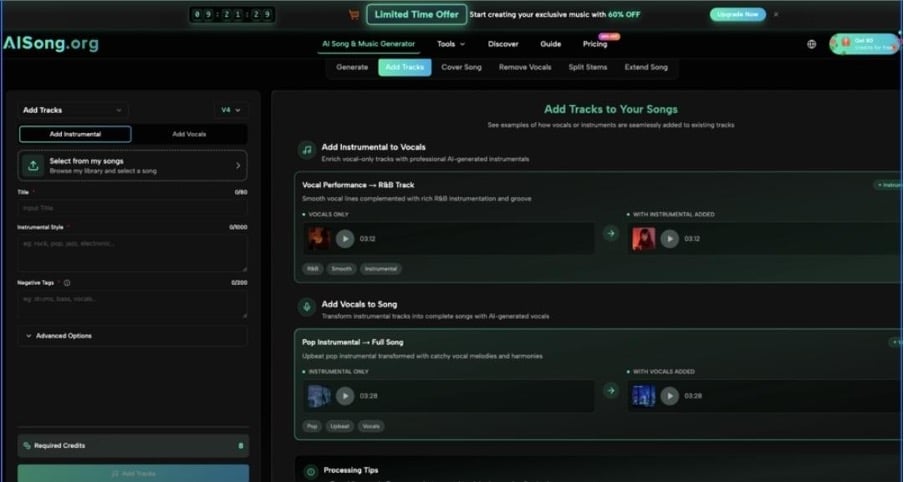
Add Tracks turns any instrumental or vocal recording into a complete song by intelligently generating the missing layer. It works in both directions: you can add AI vocals to your beats or create full instrumentals around your own voice.
Key Controls and Parameters
Add Tracks gives you a focused set of controls so you can shape the result without getting lost in technical details.
- Source selection – Choose the starting point: an instrumental track or a vocal-only recording from your AISong library.
- Lyrics and prompts – Paste lyrics or write a short description of the arrangement, style, and mood you want the new layer to follow.
- Style and genre options – Specify genre, energy, and vocal character using simple phrases so the system understands your target sound.
- Audio Weight control – Adjust how tightly the new layer locks to your original track’s tempo, key, and dynamics.
- Length and structure settings – Match the song length and basic sections to your video format or hook duration.
These streamlined controls make it easy to refine one Add Tracks at a time—vocals or instrumentals—while staying focused on the creative outcome, not on engineering tasks.
Output Quality, Licensing, and Reuse
Add Tracks delivers mixed songs designed for direct use in creator workflows, combining your original material with AI-generated layers into a cohesive track. The outputs are intended for royalty-friendly, commercial use so you can safely add them to monetized YouTube videos, branded campaigns, and social snippets. You can export in standard formats like MP3 for quick publishing or higher-quality files when you need more headroom for editing and mastering.
How to Use Add Tracks Step by Step
Step 1 – Prepare Your Material or Idea
Decide whether you’re starting from a beat or a vocal, and pick the cleanest version you have. Make sure your vocal recording is clear and your instrumental already fits the mood and tempo of your video. Jot down simple notes about style, emotion, and reference tracks so you can describe what you want quickly.
Step 2 – Configure the Feature
Open Add Tracks, select your source track, and choose whether you want to add vocals or instrumentals. Paste lyrics or write a short prompt describing genre, mood, and performance style, then set the Audio Weight and length to roughly match your planned video. For fast access while experimenting, you can jump into AI Song Maker directly from the feature navigation.
Step 3 – Generate, Review, and Export
Click generate and let AISong create the new layer around your source material. Listen once all the way through, adjust a few key settings if the balance or energy feels off, and regenerate until the track fits your idea. When you’re satisfied, export the song and drop it straight into your editor as background music, an intro theme, or a full performance segment.
Use Cases of Add Tracks for YouTube Creators
- Tech YouTubers — Turn existing intro beats into custom channel theme songs by adding AI vocals that reflect your brand, niche, and signature phrases.
- Vlog and Lifestyle Creators — Build full song arrangements around quick vocal hooks recorded on your phone, so every episode has a unique, story-driven soundtrack.
- Gaming Channels and Stream Highlights — Turn catchphrases and commentary moments into high-energy songs that match fast-paced edits and highlight reels.
- Education and Tutorial Channels — Create simple, lyrics-light background tracks that stay out of the way of voiceover while still sounding polished and consistent.
- Brand and Client-Facing Creators — Produce on-brief songs for sponsorship segments or product launches by combining client-approved lyrics with branded instrumentals via Add Tracks.
FAQ About Using Add Tracks in AISong as an AI song generator
How does Add Tracks fit with my existing YouTube workflow?
Add Tracks sits between idea creation and video editing, turning basic beats or raw vocals into finished songs inside the same ecosystem as AISong’s AI song generator. You keep using your current video editor and upload process; the only change is that your music comes from a faster, more flexible production stage.
Can I use Add Tracks outputs commercially on YouTube?
AISong is designed for creators who need music they can safely use in monetized and branded content. Tracks produced with Add Tracks are intended to be royalty-friendly for YouTube and other platforms, but you should still review AISong’s plan and licensing terms to match your specific use cases.
Are there limitations or pricing considerations for heavy YouTube use?
AISong offers different plans so creators can choose how many generations and revisions they need each month. If you publish frequently, it makes sense to select a plan that covers regular Add Tracks sessions and allows for a few extra iterations per song. Keep an eye on track length and batch limits, so your music production capacity stays aligned with your upload schedule.
Conclusion
For YouTube creators, Add Tracks inside AISong’s AI song generator workflow turns scattered beats and vocal sketches into clear, finished songs that match your visual style and release tempo. By focusing on a few simple controls and smart layering, it removes technical friction and lets you stay creative while still sounding polished.
If you’re ready to upgrade your channel’s audio identity, visit AISong, explore the platform, and try Add Tracks on your existing beats or vocal ideas. With a few focused sessions, you can build a consistent, recognizable sound that grows alongside your content.
