
Apple Music stands out as one of the premier audio streaming platforms globally, delivering an expansive catalog of high-resolution, lossless audio tracks. However, subscribers frequently encounter frustrating ecosystem restrictions tied to proprietary formats. Due to Apple’s deployment of FairPlay Digital Rights Management (DRM), your downloaded audio files remain heavily encrypted. They are playable only via authorized Apple applications, and your entire curated library instantly vanishes if you cancel your subscription.
To unlock complete control over your tracks, you can get help from an excellent Apple Music to MP3 converter. It can convert Apple Music songs to unprotected MP3 files, breaking free from Apple’s restriction. Today, we will introduce you to the top solutions, including DRmare Apple Music Converter and online AAPLMusicDownloader.
Why You Need an Apple Music to MP3 Converter?
The core challenge lies in file ownership. The platform utilizes a specific DRM (Digital Rights Management) technology called FairPlay to protect its streaming media content. Apple Music streams are cached in an encrypted M4P format. Even with an active premium subscription, you are essentially renting access rather than owning the digital assets. By utilizing a reliable Apple Music to MP3 converter, you can bypass these playback barriers and unlock several distinct advantages:
- Complete Device Independence: Enjoy seamless cross-platform playback on legacy car stereos, standalone MP3 players, SanDisk MP4 players, and non-Apple smartwatches.
- Permanent Offline Preservation: Securely back up your favorite playlists locally so your music collection remains accessible forever, even after your Apple Music subscription expires.
- Format Versatility: Convert restrictive files into universal MP3s (up to 320kbps) or alternative formats like FLAC, WAV, and M4A for different hardware configurations.
Best Premium Desktop Solution: DRmare Apple Music Converter
For audiophiles and collectors who manage massive local Apple Music libraries, DRmare Apple Music Converter is a top-tier desktop solution. This professional software is explicitly engineered to strip DRM protections from Apple Music and iTunes M4P songs with industry-leading stability.
The primary strength of DRmare lies in its powerful decoding engine and lossless output capabilities. The software efficiently circumvents copyright protections while allowing users to highly customize output parameters like bit rate and sample rate. Both experienced music producers and casual audiophiles can achieve satisfying audio quality tailored to their specific hardware.
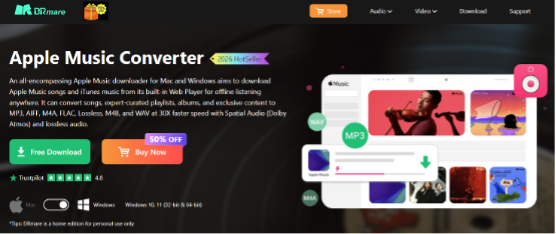
Key Technical Features of DRmare Apple Music Converter:
- 30X Conversion Speed & Batch Processing: Accelerates the encoding engine to save hours of manual effort by downloading whole Apple Music playlists to MP3 simultaneously.
- 100% Lossless Quality Retention: Preserves the original bit rates and sample rates, replicating the pristine, studio-grade listening experience.
- Built-in Web Player & ID3 Tag Editing: Access your account through an integrated Apple Music Web Player without needing the heavy iTunes app. It automatically retains and lets you edit essential metadata including title, artist, album art, genre, and track number.
- Multiple Output Formats: Export Apple Music songs to MP3, FLAC, WAV, M4A, M4B, and AIFF quick on your local computer for offline listening anywhere.
How to Convert Apple Music to MP3 with DRmare:
Step 1. Launch DRmare Apple Music Converter and Log In
First, you can download and install the official version of DRmare Apple Music Converter onto your Windows PC or Mac. Open the application. Instead of relying on a heavy external iTunes app, use the integrated built-in Apple Music Web player interface. Click to log into your Apple Music account to safely view your personalized library.
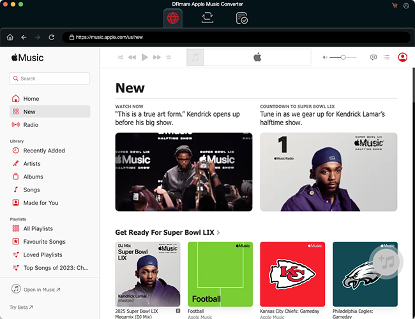
Step 2. Add Apple Music Tracks to Convert
Next, browse through your Apple Music library inside the built-in player. Open your favorite item and click the floating “Add” icon to load them. Tap the “Add to List” button to import your targeted tracks, albums, or entire playlists into the download queue.
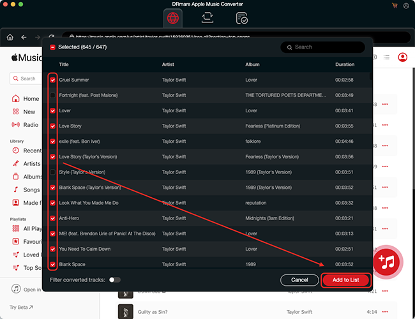
Step 3. Customize the Apple Music Output Format as MP3
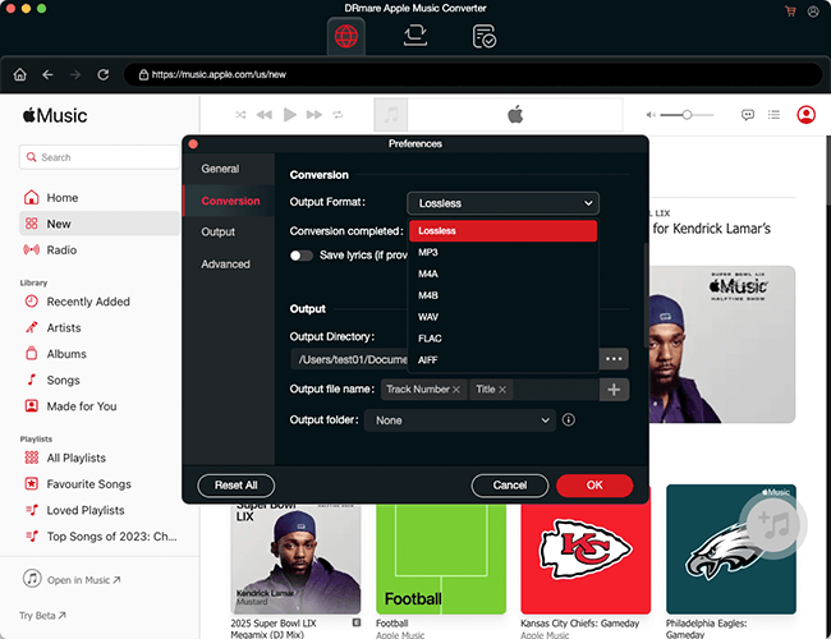
Navigate to the Settings window by clicking the “Menu” icon on Windows PC or “DRmare Apple Music Converter” from your Apple’s menu bar and choose the “Preferences” panel. Here, you can select MP3 as your core output profile.
For maximum acoustic clarity, manually dial up the audio parameters, such as adjusting the bit rate up to a crisp 320kbps, or choose alternative formats like FLAC, WAV, M4A, AIFF, and M4B depending on your storage goals.
Step 4. Download Apple Music to MP3 at 30X Speed
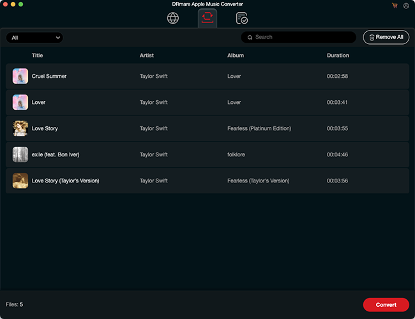
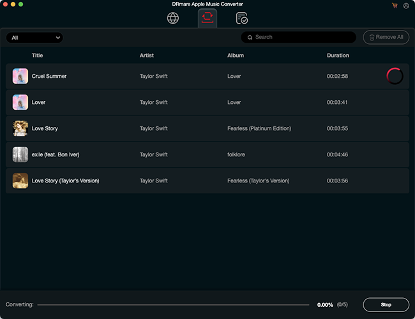
With everything configured, you are ready to create your permanent local MP3 archive. Under the “Converting” tab, you can move your cursor to the bottom right of the main interface and click the “Convert” button. The multi-threaded decoding engine will rapidly process your queue, processing batch streams simultaneously.
Step 5. Locate and Listen to Apple Music MP3 Files Anywhere
Once completed, locate the processed, DRM-free Apple Music MP3 tracks inside your designated local output folder by clicking the “Converted” > “Folder” icon. You can start to move them to any player or device for offline playback.
Pro-Tips for Advanced Audio Management
- Edit Your ID3 Tags on the Go
If you plan to load your converted MP3s into an older music management ecosystem (like an offline media player), take advantage of DRmare’s built-in tag editor. You can manually correct track numbers, fix misspelled artist names, or swap out low-resolution album artwork directly within the software before or after conversion.
- Safe Local Archiving
Remember that once these files are successfully converted to standard MP3 format, they become standard local digital assets. You can back them up to an external hard drive or a network-attached storage (NAS) device. Even if you choose to pause or completely cancel your Apple Music premium subscription in the future, these specific files will remain entirely yours to keep, forever.
Best Free Online Apple Music to MP3 Downloader: AAPLMusicDownloader
If you prefer an instant workflow without installing any desktop packages, AAPLMusicDownloader (available via aaplmusicdownloader.com) serves as a superb web-based Apple Music to MP3 alternative. This lightweight cloud utility breaks down operating system barriers, making it fully operational across Windows, macOS, iOS, and Android systems. It simplifies complex technical processes down to the absolute minimum, making it ideal for casual users or those with occasional download needs.
Key Technical Features of AAPLMusicDownloader:
- Zero Storage Footprint: Runs entirely inside mainstream browsers (Chrome, Safari, Edge) without requiring registration or local disk installation.
- Universal Mobile Compatibility: Allows users to extract MP3 audio files directly onto mobile devices like iPhones or Android tablets while on the go.
- Clean, Minimalist UX: Strips out complicated configuration toggles, executing all media parsing scripts securely on remote cloud servers.
How to Convert Apple Music to MP3 Online Free:
Step 1. Copy the Apple Music Track URL:
Open the Apple Music app or web player, select your desired song or album, and copy its direct sharing link to your clipboard.
Step 2. Paste and Parse Apple Music Tracks:
Navigate to AAPLMusicDownloader on your device, paste the link into the prominent central input field, and click “Download”.
Step 3. Download Apple Music to MP3 Online:
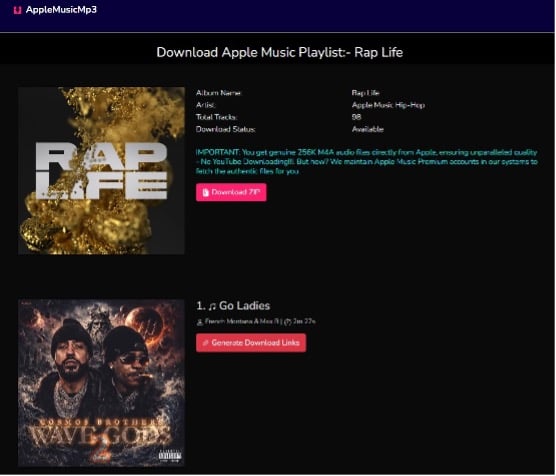
Wait a few moments for the cloud server to fetch and convert the audio stream, then click the generated “Download ZIP” or “Generate Download Link” button, and select the audio quality to save your MP3 track to your current device.
Summary Matrix: DRmare vs. AAPMusicDownloader Apple Music MP3 Converter Online
To help you select the exact tool for your workflow, here is a direct comparison based on our comprehensive product testing parameters:
| Evaluation Metric | DRmare Apple Music Converter | Apple Music Downloader (Online) |
| Software Type | Professional Desktop Application (Windows/Mac) | Web-based Cloud Tool (Browser-based) |
| Conversion Speed | Ultra-fast (Up to 30X speed) with Batch support | Variable (Depends on internet connection) |
| Output Format | MP3, FLAC, WAV, M4A, M4B, AIFF, Lossless | MP3, M4A |
| Audio Quality | 100% Lossless output (Configurable parameters) | Standard compressed audio quality |
| Metadata & ID3 Tags | Perfect preservation & fully editable | Basic track details retained |
| Batch Downloading | Supported (Entire albums/playlists with 1-click) | Limited, free version can only download 2 tracks per playlis |
| Pros & Cons | Zero audio loss, ultra-stable, batch processing<br> Requires software installation | zero installation, mobile friendly<br> Free version can only download up to 3 tracks per day, susceptible to server limits |
Final Verdict: Which Tool Is Right for You?
Your ideal choice depends heavily on your consumption scale and audio hardware while choosing the best Apple Music MP3 converter. However, DRmare Apple Music Converter is the definitive choice for power users, audiophiles, and DJs who demand flawless audio quality, robust batch conversion, and structural metadata organization for local archiving. It grants you complete digital freedom over your music collection.
Disclaimer: This guide is intended for personal, educational, and fair-use archiving purposes only. Users must not redistribute downloaded files or utilize them for commercial exploitation in violation of local copyright laws.
