

Changing your iPhone’s location can be useful for a lot of reasons — whether you want to access geo-restricted apps, play location-based games like Pokémon GO, test regional app features, or simply protect your privacy. Most people immediately think of using a VPN to fake their location, but what if you don’t want to use one The good news is, you can change your iPhone’s GPS location without a VPN easily and safely.
In this article, we’ll explain how location spoofing works, the limitations of VPNs for GPS-based apps, and practical ways to change your iPhone location without relying on a VPN. We’ll also introduce a powerful tool called MagFone Location Changer, which offers a direct and effective way to fake your GPS location anywhere in the world.
Why Change Your iPhone Location Without VPN
VPNs are excellent for masking your IP address, but they don’t actually change your GPS location. Apps like Pokémon GO, Tinder, or even Snapchat use your device’s real GPS data — not your IP address — to verify your location. Here’s why you might want to change your GPS location directly.
- Access geo-restricted apps or content on the App Store or streaming platforms.
- Play AR games like Pokémon GO in different areas to find rare Pokémon.
- Test or develop apps that depend on GPS data.
- Protect privacy by hiding your real whereabouts.
- Check local dating matches or social app content in another region.
Using a VPN won’t help with most of these because GPS-based apps will still read your physical location. That’s where GPS spoofing tools come in.
Why VPNs Don’t Work for Changing iPhone GPS Location
A VPN only routes your internet traffic through a server in another country, making websites think you’re browsing from that region. However, your iPhone’s GPS still knows exactly where you are.
If you connect to a US VPN server while in France, your IP will appear American, but Pokémon GO or Maps will still show your French location.
Apps like Instagram, TikTok, and Weather use your GPS data, not IP, to tailor results. That means if your goal is to fake your GPS location (not just your IP), you’ll need a dedicated location changer tool instead of a VPN.
The Best Way to Change iPhone Location Without VPN
The most reliable way of how to change location on iPhone without a VPN is by using professional location spoofing software on your computer.
Among various tools available, MagFone Location Changer stands out for its simplicity, accuracy, and compatibility with all iOS versions and devices.
How to change iPhone location without VPN using MagFone Location Changer? MagFone Location Changer is designed to help iPhone users fake their GPS location with just a few clicks. Whether you want to explore virtual locations in games, test region-based services, or keep your real location private, this tool does it all, no jailbreak, no complex setup, and definitely no VPN required.
- Instantly change your GPS location to any place in the world.
- Supports all iPhone and iPad models, including the latest iOS versions.
- Works with location-based apps like Pokémon GO, Snapchat, WhatsApp, and more.
- Lets you simulate real movement routes with adjustable speed.
- No VPN, jailbreak, or developer mode required.
Step 1. Download and install MagFone Location Changer on your computer. Open the program and connect your iPhone using a USB cable. Click the Start button.
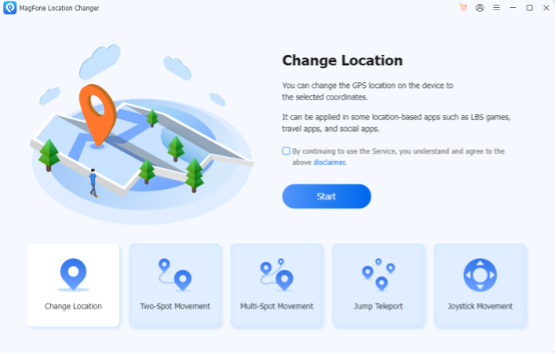
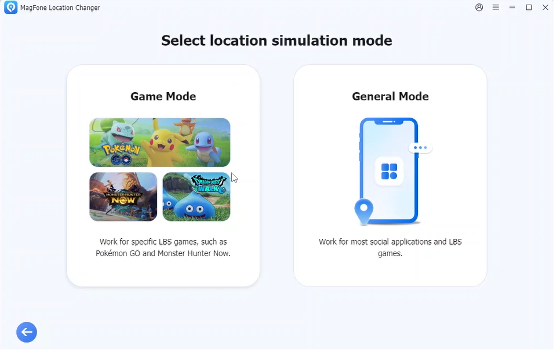
Step 2. Choose the General or Game mode on the screen. If you want to use this tool like a Pokemon Go spoofer, you can choose the Game mode.
Step 3. Enter your desired location or drop a pin on the map after you entering in the map.
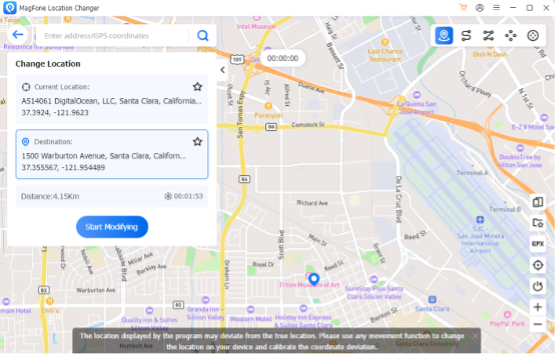
Step 4. Click Start Modify to change your GPS instantly. Now your iPhone’s GPS location will reflect the new position, and all location-based apps will read that fake location as real.
Other Methods to Change iPhone Location Without VPN
If you prefer not to use software, there are alternative approaches — though they have more limitations.
- Using Xcode (for Developers)
Apple’s official development tool, Xcode, allows developers to simulate GPS locations for testing.
However, this method is complicated and requires some technical knowledge.
This method only works temporarily while the app is connected to Xcode, requires a Mac and developer setup, not practical for daily users.
- Using Jailbreak Tweaks
Some users attempt to change GPS through jailbreak tweaks. While this may work, it’s risky — it voids your warranty, reduces device security, and may even get your Apple ID banned.
Not Recommended Jailbreaking exposes your iPhone to malware and potential data theft. With MagFone Location Changer, you’re not just masking your network location — you’re virtually moving anywhere on the planet. This makes it perfect for apps and games that depend on real GPS coordinates, not IP addresses.
Safety and Legality of GPS Spoofing
Changing your GPS location is generally safe if you use it responsibly. However, some apps like Pokémon GO have policies against spoofing for unfair gameplay advantages. To stay safe, you can follow belowing guidelines.
- Avoid teleporting too frequently in games.
- Don’t use spoofing for illegal or deceptive purposes.
- Choose reliable software like MagFone Location Changer to prevent app detection.
- Used wisely, GPS spoofing is a powerful tool for testing, exploring, and enhancing digital privacy.
Final Thoughts
If you’re wondering how to change your iPhone location without a VPN, the answer is simpler than you might think. While VPNs only change your IP address, tools like MagFone Location Changer let you modify your GPS data directly — giving you complete control over your virtual presence.
Whether you want to explore global game maps, protect your privacy, or try location-specific app features, MagFone Location Changer provides a fast, safe, and beginner-friendly solution. No complex setup. No VPN. Just one click, and your iPhone thinks you’re anywhere in the world.
