
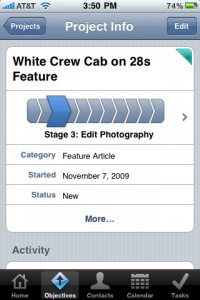
I pondered for a bit a month or so ago about the high cost of software, and about whether or not I should break down and purchase some of the pricier items. Well, it’s been a bit now, and I broke down and bought Daylite for the Mac and Daylite Touch for the iPhone. After playing around with it for a little bit, I figured I’d drop in and put in my two cents.
Daylite is a great program for getting things done, but that wasn’t really what motivated me to pick it up. I wanted a way to manage the multitude of different things I have going on at any one time. For example, right now I have 6 articles to write, 6 different ones to photograph, 3 to edit and 5 pending publication – Which is besides all of the daily things I do and my work here for Apple Gazette. But had you asked me two months ago what I had to do for work, I would’ve rambled off a list of things to do, but missed a few of them along the way. In fact, by using Daylite, I’ve found things that I needed to do and added them to my list.
Daylite Touch integrates with Daylite, and gives you a mobile way to keep track of your projects and assign tasks. I had heard mixed reviews about the functionality of the app, mainly because of the difficulty in syncing data, but I haven’t had any of those problems. Admittedly, it wasn’t easy to set up for the first time, but now that it is, I’m not having any issues. It’s nice for setting quick appointments and updating status on the go.
There are a few cons with the system. There are no push notifications for Daylite Touch, you don’t get a reminder message or note when an appointment comes up, like you would with the traditional calendar app. The easy fix is to sync the phone with the Daylite Mac app frequently, which can sync with iCal as well. Then you get notifications from the native iPhone calendar app. It’s a bit of a workaround, but it does work. The other issue is that it’s a $50/yr cost. I don’t know how the renewal process works, but the fact that I have to buy this app every year is a bit upsetting. I’d rather pay once and move forward, particularly when the cost is so high.
Overall, I think it’s a great setup. Time will tell how things go with Daylite and whether or not I use it for another year, but for now, it’s the perfect combination for what I need.


6 thoughts on “Daylite Touch”
I purchased Daylite and DL Touch and could never get touch to sync with the desktop program. The error codes mentioned keychain failures and the developer said it was an apple issue and that they were working with apple to resolve the problem. Funny thing is that I don’t see anyone else on the web that had the same problem. did anyone else find a solution to the DL Touch registration/sync problem? Snow Leopard 10.6.2 and most recent versions of everything else……Thanks, as I would love to keep using Dl.
I was using Daylite Touch and syncing Daylite with iLife and Google Apps, which led to a ton of sync issues and even had a few appointments vanish. The main benefit of Daylite is that it combines so much into one application, but the only thing it does well is linking. Task management is extremely clunky, and the sync issues and lack of push notifications are deal breakers for me.
A complete disaster. It has never worked, and I consider the purchase of Daylite Touch to have been a huge money dump. It simply won’t connect and sync with the database, and looking at their support forums there are many who have the same issue.
They don’t seem to care that it doesn’t work. I spent days, literally, trying to get this to work.
The company is not responsive to user concerns. Even the partbrrs don’t seem to be given enough info to help their clients. Syynching issues seem to arise far too frequently and are not easily solved, or due to simple errors.
When it goes it is great, but most of us can’t afford a day here and there of lost productivity while we get synching going again.
It works but it is not robust.
As Apple have demonstrated. Leave the feature out until it works, then build on a solid foundation. Take heed Marketcircle.
Further to last post. Daylite Server Admin does not show my offline database, yet the offline database says it synched a minute ago. Further to that, the same Organisation has notes on the desktop (online database) that do not appear on the offline database.
And, what’s more the iPhone says it has not synchronised for a month, and it comes up with (OSStatus error -9824), which Google cannot find. The indications are that one or more databases should be wiped and then re-synched. So what data do I choose to lose. Of course I should not have to make that choice EVER, if this was a reliable repository for my data.
Market Circle say – Do Not Upgrade to Lion because of compatibility problems – and I suspect that OSX 10.6.8 may have similar problems, given that it was mainly in preparation for Lion compatibility.
I may as well ditch the lot and have a CRM totally on my phone, at least it is always available, always on, and never logged in as another user.
Sheesh. Sufferin’ succotash.
Restarted the MacPro with the Daylite Server on it. Quit the Daylite on the MBP (offline one). Relaunch offline, and use File > Database > Go Online to take it live. MBP tells me Daylite is synchronising the offline database as it transitions to online. It now shows all the missing data that resides on the MacPro. Not sure of a record to check for the reverse case scenario. Take MBP offline and it does the same sync _and loses the extra dozen notes_ !!
Wow, that really helped. Daylite Server Admin now does show the offline database details. But they indicate the last sync was (21 July 2011) 4 months ago, even though it just successfully completed more than one sync today. I can now “Wipe” or “Delete” the offline database. Really, but how do I know if unique data will make it to the Server copy???
I bit the bullet and wiped the offline and re-synced. It seems to be OK, and Daylite Server Admin shows the current date for the last sync of the offline.
So now the Daylite Touch. With some research, I have discovered that Daylite Touch on the iPhone has happily upgraded itself to a version incompatible with the rest of my Daylite software. A warning would have been nice. Downgrading apps on the iPhone is non-trivial and it may just mean no Daylite on the iPhone for a while. Daylite Touch 1.7 requires Daylite 3.11 to sync with. So now I have gone from having a non-synced version of Daylite Touch to a wiped database on the iPhone and no easy way to recover it.
So I reiterate – DONT UPGRADE ANYTHING ON ANY DAYLITE DEVICE WITHOUT FIRST CHECKING DETAILS AND EXPERIENCES ON THE DAYLITE WEBSITE AND FORUMS. Not the OS, Not the Daylite software and not any software that Daylite interacts with. iCal moving to the Cloud has made this sync harder as well – you have to buy third party software, and use “the data sieve” Google, as part of the chain.
I believe Daylite do offer a Cloud solution at a price. This may be the only simple way to get it to work reliably. At least they hopefully have active support for the Cloud solution. But question this first.
I concur with others, once again – the idea is great, the implementation sucks.